

Most enterprise documents contain charts, tables, and diagrams. Most LLMs cannot process them. When you feed a 30-page report to an LLM, it reads the paragraphs and skips the visuals. The answer you get back reflects that gap.
This is a structural limitation since LLMs are trained on text. Given that a revenue chart or a process diagram is not text, the model ignores these elements or attempts to infer around them, which often leads to what we call hallucinations, and it does not provide reliable output.
Retraining models to handle images requires major capital and time. For most organizations, Multimodal RAG offers a more practical path to extend existing LLM’s capabilities by retrieving and processing visual content alongside text.
How multimodal RAG works
RAG (Retrieval Augmented Generation) systems retrieve relevant content from your documents and pass it to an LLM as context. Standard RAG handles text while Multimodal RAG extends this to images, charts, audio, and video.
The architecture has five components:
- Embedder: Converts content into numerical vectors that represent meaning
- Vector database: Stores vectors for efficient retrieval
- Retriever: Finds relevant content when a query comes in
- Reranker: Orders results by relevance (optional, but improves accuracy)
- Generator: The LLM that produces the response
If we can replace a text-only embedder with a multimodal embedder, your retrieval system can pull chart data alongside written content and the LLM receives complete context of your document.
Three architecture options
Each approach makes a different trade-off between accuracy and computational cost. Below you will find each option broken into its relevant components to fully understand the architectural elements.
Option 1, the full multimodal pipeline
- Components: Multimodal embedder + Multimodal LLM
- Process:
- Extract all document elements including text, images, tables, charts.
- Embed everything directly using models like KaLM, Llama-Embed-Nemotron-8B, or Qwen3-Embedding-8B.
- Store vectors in a shared space.
- The multimodal LLM receives both vector representations and original images when generating responses.
- Appropriate use cases: Any domain where a missed visual detail can lead to material error. These include financial analysis, medical imaging, and legal document review.
- Resource requirements: High-end GPU, large memory allocation. Highest accuracy, highest infrastructure cost.
Option 2, the hybrid pipeline
-
Components: Vision-Language Model + Text embedder + Multimodal LLM
-
Process:
- A VLM generates text descriptions of each image.
- These descriptions are embedded using a standard text embedder.
- During retrieval, the system passes both the text description and the original image to the multimodal LLM.
-
Appropriate use cases: Workloads requiring visual accuracy without full multimodal embedding costs. The multimodal LLM can reference original images when descriptions lack precision.
-
Resource requirements: Moderate. Lower embedding costs, some accuracy recovery through the multimodal generator.
-
Limitation: VLM descriptions can lose nuance. A chart described as “upward trend” may show a 2% increase or a 15% increase - the distinction may matter for your use case.
Option 3, the text-only generator
-
Components: Vision-Language Model + Text embedder + Standard LLM
-
Process:
- VLM describes all images.
- Text embedder vectorizes descriptions.
- Standard LLM generates responses from text only.
-
Appropriate use cases: High-volume, lower-stakes applications. Internal knowledge bases, customer support documentation, general Q&A.
-
Resource requirements: Minimal GPU needs. Lowest cost.
-
Limitation: Output quality depends entirely on VLM description quality. Information not captured in the description is unavailable to the LLM.
The architecture below shows how each option handles document content from ingestion through answer generation.
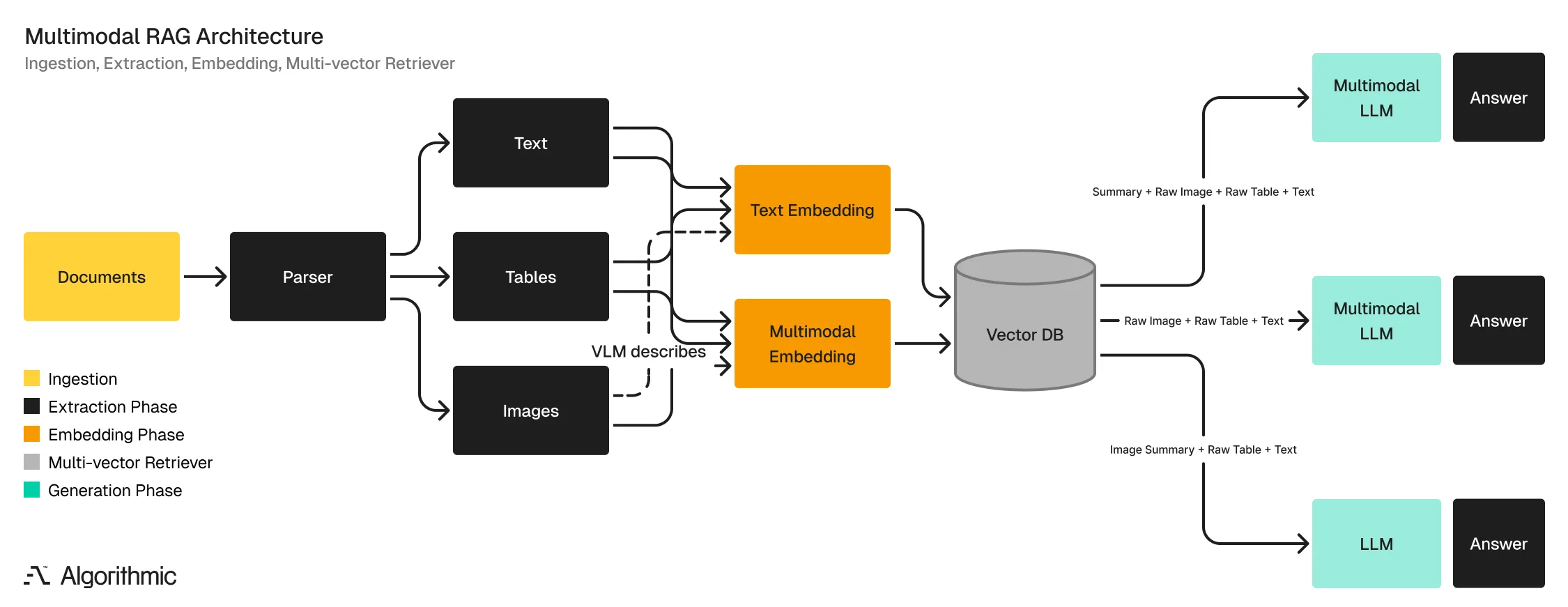 Click to expand
 Comparison of the three architectures
| Factor | Option 1 | Option 2 | Option 3 |
|---|---|---|---|
| GPU requirement | High | Moderate | Low |
| Accuracy ceiling | Highest | High | Variable |
| Infrastructure cost | $$$ | $$ | $ |
| Use case | Critical decisions | Balanced requirements | Volume workloads |
What you need to understand before building
Images consume context fast
Every LLM has a context window, a limit on how much information it can process in a single request. Text is measured in tokens, roughly 4 characters each, and images are converted to tokens too, expensively. A single high-resolution image can consume 1000 to 2000 tokens, so a document with 20 charts could use 30K or more tokens on images alone.
GPT-4o’s context window is 128K tokens and Claude’s is 200K. These sound large until you load a few detailed documents.
You are unable to send an unlimited number of images to a Large Language Model (LLM). Your retrieval system must exercise selectivity. If you retrieve fifty relevant images, you may only be able to pass ten to the generator. The reranker becomes key as it determines which ten are to be selected.
Vectors and images live in different places
When you embed an image, the vector database stores only the numerical vector - a list of numbers representing meaning. The original image file is not stored there.
You need a separate storage layer (S3, Azure Blob, GCS) to hold original images. The vector database stores a pointer (usually a URL or file path) alongside each vector. When retrieval happens, your system fetches the vector from the database and the original image from blob storage.
Your infrastructure now carries two systems to maintain instead of one, and latency depends on both. If your blob storage is slow, the entire pipeline slows down, so budget for both.
The VLM description is the weakest link
In Options 2 and 3, a Vision-Language Model describes each image in text. Everything downstream depends on that description. Consider a chart showing quarterly revenue such as $4.2M, $4.1M, $3.9M and $2.4M. A VLM might describe this as “a bar chart showing declining revenue over four quarters”. Accurate, but it lost the specific numbers and facts, such as that Q4 dropped by 38% while previous quarters declined by only 2 to 5%.
If a user later asks “What was the Q4 revenue decline?” and the system only has the description, the system will provide a vague or incorrect response.
VLM quality directly caps your system’s accuracy. A mediocre VLM creates a mediocre RAG system regardless of how good your LLM is. When evaluating vendors or building in-house, the VLM deserves as much scrutiny as the generator.
Document parsing is 60% of the work
Before any embedding happens, documents must be parsed. This means:
- Extracting text while preserving structure (headers, lists, paragraphs)
- Identifying and extracting images, charts, and tables
- Determining which images belong with which text sections
- Handling PDFs, Word docs, PowerPoints, scanned documents
- Dealing with inconsistent formatting across document types
Tools like Unstructured.io handle much of this, but edge cases are common such as a table that spans two pages, a chart embedded as a vector graphic or a scanned PDF with no OCR layer.
Teams frequently underestimate parsing complexity. A proof-of-concept with clean documents performs well but in production the documents can be quite varied. It is important to have test datasets that are representative of the real world and teams must budget time for parsing edge cases since they will appear.
Shared vector space is non-trivial
Multimodal embedders place text and images in the same vector space. This means a text query like “Q3 revenue performance” should return both relevant paragraphs and relevant charts based on vector similarity. This works because multimodal embedders are trained on paired data such as images with captions or charts with descriptions. The model learns that a bar chart showing revenue and text discussing revenue should have similar vectors.
Different embedders have different vector dimensions, with 512, 768, 1024, and 1536 all common, and you cannot mix them. If you embed some documents with a 768-dimension model and others with a 1536-dimension model, they cannot be searched together. Choose an embedder and commit to it through the entire project.
Switching embedders later means re-embedding your entire document corpus. For large collections, this is expensive and time-consuming. Evaluate embedder options thoroughly before production deployment.
Latency adds up
A typical multimodal RAG query involves:
- Embed the user query (50 to 200ms)
- Search vector database (20 to 100ms)
- Fetch original images from blob storage (50 to 300ms per image)
- Rerank results (100 to 500ms)
- Send context and images to LLM and generate response (1 to 10 seconds)
Option 1 (full multimodal) adds latency at step 1 (multimodal query embedding) and step 5 (larger context). Option 3 (text-only) is fastest while Option 2 falls between.
User-facing applications need sub-3-second responses to feel responsive. Batch processing can tolerate more latency so you must design your architecture for your latency requirements along with accuracy requirements.
You need an evaluation framework
How do you know if your multimodal RAG system is working? You need test cases with known answers.
You should build a test set of say 50 to 100 questions where the answer depends on visual content. Include the correct answer for each. Run queries through your system and measure:
- Retrieval accuracy: Did the system retrieve the right images?
- Answer accuracy: Did the final answer match the expected answer?
- Failure analysis: When wrong, was it a retrieval failure or a generation failure?
Without measurement, you cannot improve. You also cannot justify infrastructure costs. “The system works well” is not a business case. “The system answers 94% of visual dependent queries correctly, up from 31% with a text only RAG” is a business case.
Audio and video applications
For Audio, embedders like Amazon Nova Multimodal Embedding and CLAP vectorize audio signals directly, preserving tonal and temporal features. The alternative is transcription followed by text embedding which reduces cost but discards non-verbal information. Transcription works for meeting summaries. Direct audio embedding is preferable when tone or delivery carries meaning.
For video, models like VLM2Vec-V2 capture both spatial content (what appears in frames) and temporal patterns (how content changes across frames). This remains emerging technology, so most production implementations extract keyframes and process them as images.
Our suggested approach
- Start with Option 3: Build the pipeline using VLM descriptions and text embedding. This validates document parsing and retrieval logic without GPU complexity.
- Measure gaps: Track queries where users identify missing information that was visible in images. These cases indicate where accuracy requirements exceed the capabilities of Option 3.
- Upgrade selectively: Move document types with frequent accuracy gaps to Option 2. Maintain Option 3 for workloads where it performs adequately.
- Deploy Option 1 for critical paths: Reserve full multimodal pipelines for workflows where accuracy errors carry material consequences.
- For document parsing use Unstructured.io.
- For orchestration you can use LangChain.
- For models you can rely on HuggingFace.
- For vector databases you can use Pinecone, Weaviate, Qdrant, and Chroma. All of them support multimodal workflows with varying feature sets.
Final notes
LLMs trained on text cannot process visual document content. Multimodal RAG addresses this limitation by retrieving and converting images, charts, audio, and video into an LLM-compatible context.
Three architecture options exist, and each trades accuracy for cost. Before building, understand your constraints, including context windows that limit how many images you can process, VLM quality that caps your accuracy ceiling, document parsing that will take longer than expected, and the need for an evaluation framework from day one.
Match the architecture to your accuracy requirements and budget constraints. Start with the lowest-cost option, measure where it fails, and upgrade selectively.
Algorithmic builds multimodal RAG systems through our AI agents and automation practice, and deploys computer vision pipelines for organizations where visual data carries critical business information. See how we applied production vision systems for FMCG package inspection on high-speed manufacturing lines. Start a conversation if visual content in your documents is leaving gaps in your AI answers.
If you’d like to follow our research, and case studies, connect with us on LinkedIn, Instagram, Facebook, X or simply write to us at info@algorithmic.co