

SBI’s 2025 SaaS growth research found that Net Revenue Retention fell from 110.5% in 2023 to 107.1% in 2025. In the same study, 58% of companies reported lower NRR than two years earlier. SBI and QuadSci also reviewed 160 billion telemetry data points across 9,100 customer accounts and found that solution usage explained 80% of renewal and expansion outcomes.
That finding should change how SaaS founders choose between new features and workflow repair. Retention comes from repeated completion of the customer’s core job. Products that support only fragments of that job lose adoption at every handoff.
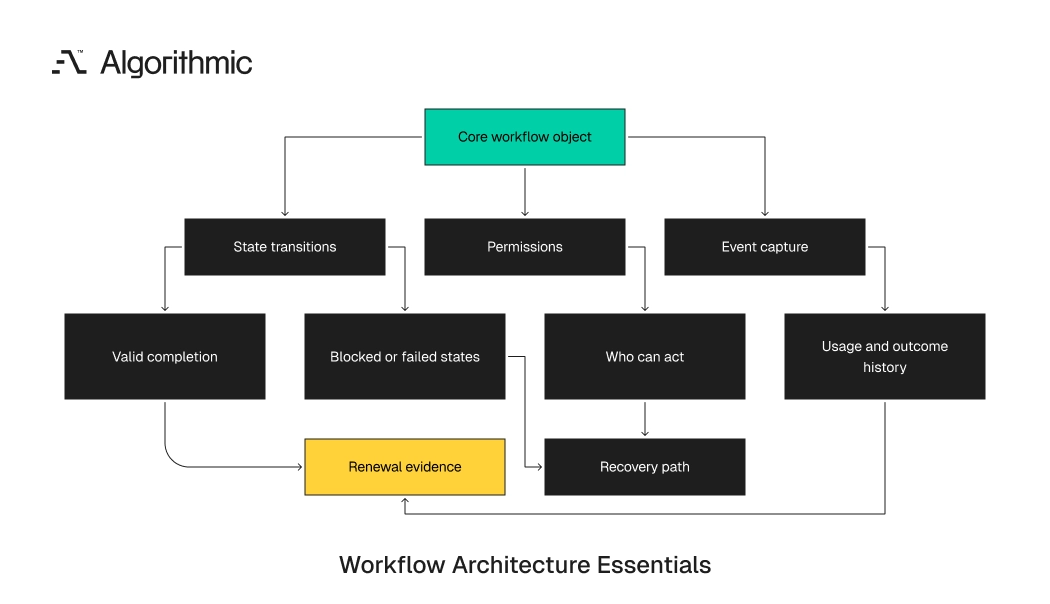
This principle applies during a full product build from scratch, a SaaS product development effort, and a redesign after early traction. Roadmap volume can look productive in a board update. End-to-end usage creates the behavior that renewals depend on. A retained SaaS product behaves like a production system. It has inputs, state transitions, permissions, observability, recovery paths, and feedback loops. Feature count measures inventory; completed workflow rate measures operating value.
For a founder, the practical conclusion is direct. The product should help a defined user complete a defined job often enough to become part of the customer’s operating rhythm. Everything else belongs behind that standard.
Feature count is a weak proxy for retained value
Feature inventory helps in sales conversations because buyers compare products through visible lists. A CRM buyer asks whether the product includes email sync, lead scoring, pipeline views, reminders, enrichment, reporting, and Slack alerts. Each item sounds useful during procurement.
Daily users experience the product through sequences. A junior sales representative imports a lead list, cleans records, assigns accounts, sends outreach, tracks responses, updates status, and reports activity. If three steps require CSV exports, admin approval, or another tool, the product loses its place in the working day. Feature usage analytics must measure sequences, not isolated clicks. A dashboard view has one meaning after successful campaign creation. It has another meaning when a manager checks inactive accounts during a renewal escalation.
Usage depth depends on completion, frequency, and return behavior. A user who clicks five features once has lower retention value than a user who completes one workflow every week. Renewal risk appears in the gap between activity and completed work.
Recent writing on product usage analytics for retention makes the same operating point. Account health cannot be judged only near renewal. By then, weak usage patterns have already become contract risk. A scientist-builder treats this as an instrumentation problem before treating it as a roadmap problem. The product needs a measurable unit of work, a baseline completion rate, and a clear drop-off point. Without those three artifacts, feature planning becomes preference management.
The unit of work should match the customer’s operating language. In sales, that unit can be a qualified opportunity moved through a defined pipeline stage. In finance, it can be a variance investigated, approved, and closed before month-end reporting. This distinction changes the roadmap conversation. A new screen creates surface area. A completed workflow creates evidence that the product has entered the customer’s operating system.
Retention lives in the handoffs between steps
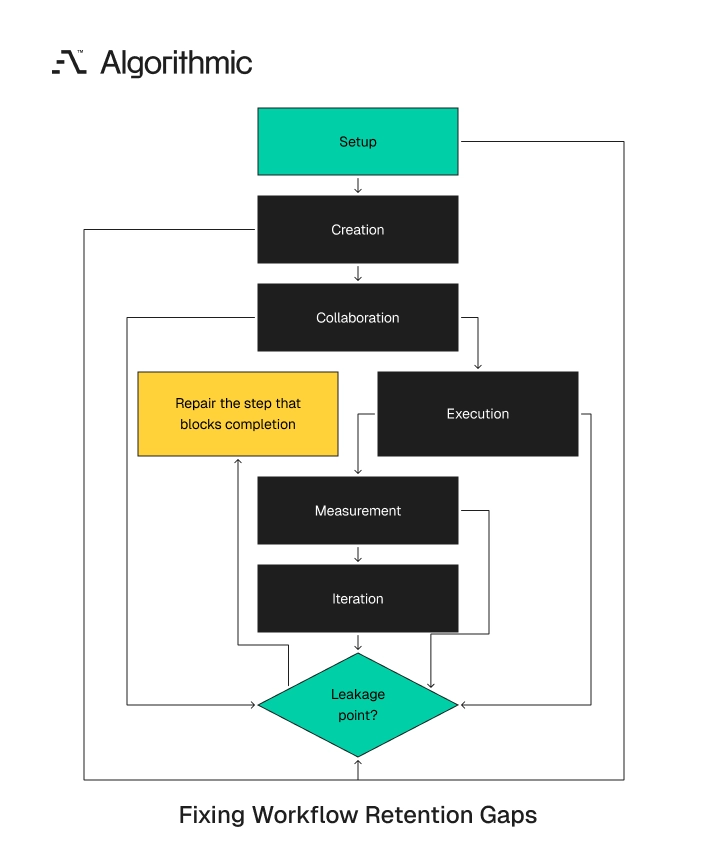
A handoff is any point where the user leaves the product, waits for another person, changes permission context, or re-enters data. It also includes any point where the user finishes the job in another system. Handoffs weaken adoption because intent and momentum decay.
In a content marketing SaaS product, the workflow includes ideation, drafting, approval, scheduling, publishing, and analytics. A product with a strong editor and no scheduling sends the user into Buffer, Hootsuite, LinkedIn, or a native publishing tool. The user then builds a parallel operating rhythm outside the product. A product with analytics that cannot connect performance to the original content plan becomes a reporting layer. Reporting layers face budget scrutiny because users can replace them with dashboards. Working systems keep their position because users depend on them to finish the job.
The same pattern appears in recruiting, finance, logistics, healthcare operations, and field service. A scheduling feature without permissions creates approval queues. An analytics feature without source data lineage creates disputes during weekly reporting. A billing feature without pricing rules creates manual operations work. A recruiting product without offer approvals pushes sensitive decisions into email. A logistics tool without exception handling leaves dispatchers managing the highest-risk work in spreadsheets.
Competitor articles often address this topic through feature count. For example, discussions of feature creep in SaaS roadmaps warn against adding low-value work. The deeper engineering decision concerns where the product must own the sequence. A product owns the sequence when users complete the work without avoidable transition cost. That cost includes duplicate entry, waiting time, permission confusion, lost context, and manual reconciliation. Each cost reduces the chance that users return the next week.
In production systems, handoffs show up as failed state transitions. The user intends to move an object from draft to approved, approved to scheduled, scheduled to measured, and measured to repeated. The architecture must preserve state, ownership, and history across that path, which is why product delight fails at integration seams when state is lost between systems. The handoff also carries commercial meaning. If users export data every Friday to prepare a weekly meeting, the product has trained them to finish the decision outside the system. That export volume is a retention warning, not a neutral usage metric.
 Click to expand
 A founder should inspect these handoffs before approving another feature. The work often sits in permissions, import validation, notifications, API reliability, and audit history. These items rarely win a demo, yet they determine whether the product remains in daily use.
The end-to-end usage model
End-to-end usage means the product supports the full path from setup to repeated value for a defined user role. The product must own the points where the user’s job stalls. Adjacent tools can remain outside the product when state, context, and accountability stay intact. For SaaS founders, this definition creates a sharper roadmap test. A feature earns priority when it removes a transition that causes abandonment, setup burden, support demand, or renewal risk. The test ties engineering work to retained behavior.
This model also disciplines the first version of a product. A narrow workflow with clean state transitions outperforms a wide catalog with weak connective tissue. Founders should choose the core job, then engineer the shortest reliable path to repeated completion. The model also protects engineering capacity. Early teams have limited bandwidth, often five to twelve engineers across product, platform, and data work. Every item outside the workflow must compete against the repair work that improves completion.
1. Setup must reach first value in days
Setup is part of the product experience. If onboarding requires a solutions engineer, a customer success manager, and three data imports before value appears, the product has borrowed adoption from services. That borrowed adoption later appears as margin pressure and slow activation.
For a mid-market SaaS product selling at $18,000 annual contract value, a 10-hour implementation process at $150 per internal hour consumes $1,500 of gross margin. The account pays before it has formed a usage habit. Across 100 new customers, that creates $150,000 of annual labor cost that product architecture should reduce. The engineering work can be operationally plain: role templates, guided data mapping, import validation, sample workflows, default notifications, and permission inheritance. These features rarely lead a demo. They reduce the time between contract signature and the first completed workflow.
A strong setup path also protects the customer success team. If 40% of new customers ask the same import questions, the product has a design gap. If role setup takes three calls, the permission model needs product work. Setup also creates the first data quality boundary. Imports should fail with field-level errors, not silent corruption. A founder who treats import validation as a later task accepts future support tickets as an architectural cost.
The setup path should produce a clean event trail. The system should record who imported data, which fields failed validation, which roles were assigned, and when the first workflow completed. Those events help the team distinguish poor onboarding from poor product design.
2. Creation, execution, and feedback must connect
A product that helps users create work should also support execution or measurement where those steps drive retention. Separating creation from execution creates a gap between effort and outcome. Users then build another habit in the system that completes the job. In a social content platform, drafting posts without scheduling leaves operating work elsewhere. Scheduling without analytics blocks learning. Analytics without connection to drafts creates a separate reporting habit.
The strongest retention pattern comes when the user can create, execute, measure, and repeat inside one system of record. This is workflow architecture. It requires data models that connect objects across stages: campaign, asset, approval, channel, publication, metric, and recommendation. The same principle applies in finance software. A budget planning module has limited retention strength if approvals, variance review, and actuals sit outside the product. Finance teams renew systems that carry planning decisions into monthly operating control.
The engineering tradeoff is concrete. A faster build stores each stage as an unrelated table and joins them later through reporting code. A better build defines shared identifiers, state machines, and event streams before the first customer uses the workflow. This early architecture decision affects every future release. If the campaign object, approval object, and reporting object lack a shared identifier, every later workflow improvement requires reconciliation work. The product pays that tax through slower releases and weaker analytics.
3. Pricing must match customer progression
Plan design can create workflow breaks. If the entry tier includes templates and email capture, the launch tier should include the reporting needed to validate performance. If analytics are gated too late, customers cannot prove value while trust is still forming. Progression-based tiers work better than arbitrary feature separation. A simple structure is Start, Launch, and Scale. Each tier should contain the baseline features required for that stage.
Limits should come from volume, seats, data retention, automation depth, or governance depth. Customers understand a higher price when account volume doubles or audit requirements increase. They resist upgrades that block the next natural step in their work. This reduces support escalations because customers understand why they upgrade. It also protects retention because the product does not block the customer’s maturity curve. Pricing becomes part of the workflow design.
Pricing logic belongs in the architecture, not only in a Stripe configuration screen. Entitlements affect permissions, event tracking, exports, integrations, and support diagnostics. A weak entitlement model turns every plan change into engineering risk. A practical entitlement design names the account, plan, role, limit, and restricted action in the same model. The API should return consistent responses when a user reaches a limit. Support teams should see the same entitlement state that the product enforces, which is why support tooling belongs in backend product work rather than in a separate admin console.
The workflow retention map
SaaS teams need an artifact that connects product planning to retained usage. The Workflow Retention Map gives founders, product leaders, and senior software development teams a shared planning instrument. It links user intent, leakage, product work, and renewal evidence.
| Workflow stage | User intent | Common leakage point | Product work that reduces leakage | Retention metric |
|---|---|---|---|---|
| Setup | Configure account and import data | Data mapping errors, unclear roles | Guided import, validation, role templates | Time to first completed workflow |
| Creation | Build the work object | Blank-state friction, missing templates | Templates, examples, assisted creation | Objects created per active account |
| Collaboration | Get approval or input | Permission delays, unclear ownership | Role-based access, approval flows, comments | Approval cycle time |
| Execution | Publish, send, process, or schedule | Export to another tool | Native scheduling, API integrations, job queues | Completed executions per week |
| Measurement | Understand outcome | Metrics disconnected from original action | Linked analytics, event tracking, attribution | Return visits after result delivery |
| Iteration | Repeat with learning | No recommended next action | Saved workflows, recommendations, alerts | Repeat workflow rate |
This map gives each proposed feature a job. If a feature does not reduce leakage at one of these stages, it belongs below workflow repair in the roadmap. A product team can use this table during quarterly planning and weekly scope review.
The table also helps technical leaders separate interface work from architecture work. A new screen can improve creation. A durable retention gain often requires event-driven architecture, background jobs, data lineage, and permission changes.
A practical review uses real account evidence. Select 20 accounts that renewed, 20 that contracted, and 20 that churned. Map their completed workflow counts, export volume, approval delays, integration errors, and support tickets. Patterns emerge quickly when the data is organized by workflow stage. Churned accounts often show incomplete setup, stalled collaboration, or measurement gaps. Renewed accounts usually show repeated workflows across multiple roles.
This exercise should produce an engineering backlog, not a workshop artifact. Each leakage point should have an owner, a baseline metric, and a target date. The team should review the same map after each release and compare behavior against the baseline. The map also creates a shared language for product, engineering, customer success, and sales. Customer success can point to stalled approvals instead of describing a vague adoption issue. Engineering can size the permission and event work needed to repair the workflow.
For a 20-person SaaS company, this discipline prevents scattered work. The team can focus a six-week cycle on one leakage point and measure completion before starting the next item. That cadence produces better decisions than a queue of unrelated requests.
Engineering work behind retained workflows
End-to-end usage often requires backend work that sales teams cannot demo in 90 seconds. That work determines whether the workflow holds under real customer conditions. It also determines whether growth adds operating load or improves product evidence. The engineering team needs to treat retention as a system property. Interface design drives adoption, while data design, permissions, integrations, and event capture preserve the workflow. A senior builder evaluates all five during scope definition. Treating those layers as one SaaS product build keeps the workflow intact as the customer base grows.
This work also affects unit economics. A workflow that requires manual reconciliation by customer success reduces gross margin as the customer base grows. A workflow that records state, errors, and outcomes gives the team evidence without adding headcount.
 Click to expand
 Permissions must reflect how work moves through teams
B2B SaaS products fail when permission models are added after workflows have already formed. A content tool needs authors, reviewers, approvers, schedulers, and account owners. A finance tool needs preparers, approvers, controllers, auditors, and external accountants. A flat admin/member model creates operating limits. Users then share accounts, export data, or move approvals into Slack and email. Each workaround weakens product usage data and increases security risk.
A production-ready software development effort should define permission roles during database schema design. Retrofitting role-based access control after customers depend on the product can take 4 to 8 weeks. That work includes migration scripts, test coverage, audit logs, permission regression tests, and customer communication.
The cost rises when permissions touch billing, analytics, and external integrations. A change to account roles can affect Stripe entitlements, Salesforce sync logic, and warehouse reporting tables. Early permission design reduces those later coordination costs. Permission design should start with workflow states. The team should decide who can create, edit, approve, schedule, publish, reopen, export, and delete each object. Those decisions belong in the data model, the API layer, and the audit trail.
This design should also cover delegation and temporary access. A finance controller on leave still needs approval coverage before the close deadline. A content director may assign publishing rights to an agency for one campaign and remove them after launch. Permissions become product behavior when users face deadlines. If the right person cannot approve a workflow before a cutoff, the team finishes the job in email. The product then loses both usage depth and the event history needed for renewal evidence.
Integrations must remove re-entry
Integrations create value when they eliminate duplicate entry or preserve workflow state. A Slack notification that sends users back into a half-finished task has value. A generic alert feed that duplicates email creates noise. High-retention integrations usually connect four object types: identities, work items, status changes, and outcomes. For a CRM-linked product, that means users, accounts, opportunities, activities, and revenue events. For an HR product, that means employees, roles, approvals, documents, and effective dates.
The integration architecture matters. Webhooks, retry queues, idempotency keys, OAuth token refresh, and dead-letter queues protect the workflow when external systems fail. Without those components, an integration becomes a support burden. This is visible in support queues. If customers ask whether a record synced, the product lacks state transparency. If customer success manually reconciles failed events, the integration design is incomplete.
A strong integration shows the user what happened, what failed, and what action comes next. It also gives the engineering team enough event history to diagnose failures within minutes. That history should include request IDs, timestamps, source systems, and retry outcomes.
This work is invisible in most sales demos, yet it determines renewal risk in connected products. A failed sync during month one trains the customer to distrust the system. A clear failure state with a successful retry preserves confidence. Integrations should also respect the source of truth. If Salesforce owns account status, the SaaS product should record the incoming value, transformation rule, and last successful sync. If the product owns workflow state, external tools should receive the status without overwriting it.
These rules prevent silent data conflicts. Silent conflicts create the worst class of support ticket because the customer sees two systems with different answers. A clear state model gives the team a path to repair the issue without guessing.
Analytics must close the loop to the original action
Analytics drive retention when users connect an action to an outcome and decide the next step. A chart that shows aggregate activity has limited operating use. A view that links a campaign, cohort, workflow, or account segment to a measurable result has greater retention value.
This requires event taxonomy discipline. Teams should define canonical events such as workflow_created, approval_completed, execution_scheduled, result_received, and workflow_repeated. Those events should include account ID, user role, object ID, plan tier, timestamp, and source system.
A thesis on feature usage correlation with customer retention reflects a broader shift toward measuring how product behavior relates to renewal. SaaS teams need sequence measurement in addition to feature measurement. Presence of usage does not prove completion of the job.
Event design should start before the first production release. Retrofitted analytics often miss role, source, and object fields because the early schema lacks them. Product leaders then make roadmap decisions from incomplete usage data. A clean event model also improves customer conversations. Account teams can show that a customer completed 14 workflows last month, stalled on approvals twice, and returned after result delivery. That evidence beats generic login counts during renewal review.
The warehouse model should mirror the product workflow. A table for accounts, a table for users, and a table for events is rarely enough. Retention analysis needs workflow instances, state changes, actor roles, object relationships, and outcome measures. Analytics should also record negative events. A failed import, blocked approval, expired token, and cancelled job each explain why a workflow stopped. These events help teams repair the product before a customer reaches renewal risk.
The product team should review these events weekly during early growth. A weekly review catches new leakage before it becomes normal operating pain. Monthly review cycles allow too many customers to form workarounds.
State management must survive real operations
Many early SaaS products store status as a text field: draft, approved, sent, closed. That approach works during a demo and fails under concurrent edits, retries, exceptions, and role-specific actions. A retained workflow needs explicit state transitions. A production workflow should define valid transitions, blocked transitions, system-triggered transitions, and recovery paths. For example, a scheduled publication can move to failed, retried, published, or cancelled. Each transition should have an actor, timestamp, reason, and downstream event.
This is ordinary engineering discipline, yet it changes retention. Users trust systems that represent the real status of their work. They abandon systems that show stale, ambiguous, or contradictory states.
State management also protects analytics quality. If the system records only the final status, the team cannot see where the workflow stalled. If the system records transitions, product leaders can measure queue time, retry rate, and approval latency. State transitions should also support exception handling. A payment can fail because of card decline, expired authorization, gateway timeout, or fraud review. Each failure needs a different recovery path and a different customer-facing message. Concurrency deserves the same care. Two users approving the same item, editing the same record, or retrying the same job can create duplicate work. Versioning, locks, and idempotency keys protect the workflow from these production conditions.
A concrete prioritization test for SaaS roadmaps
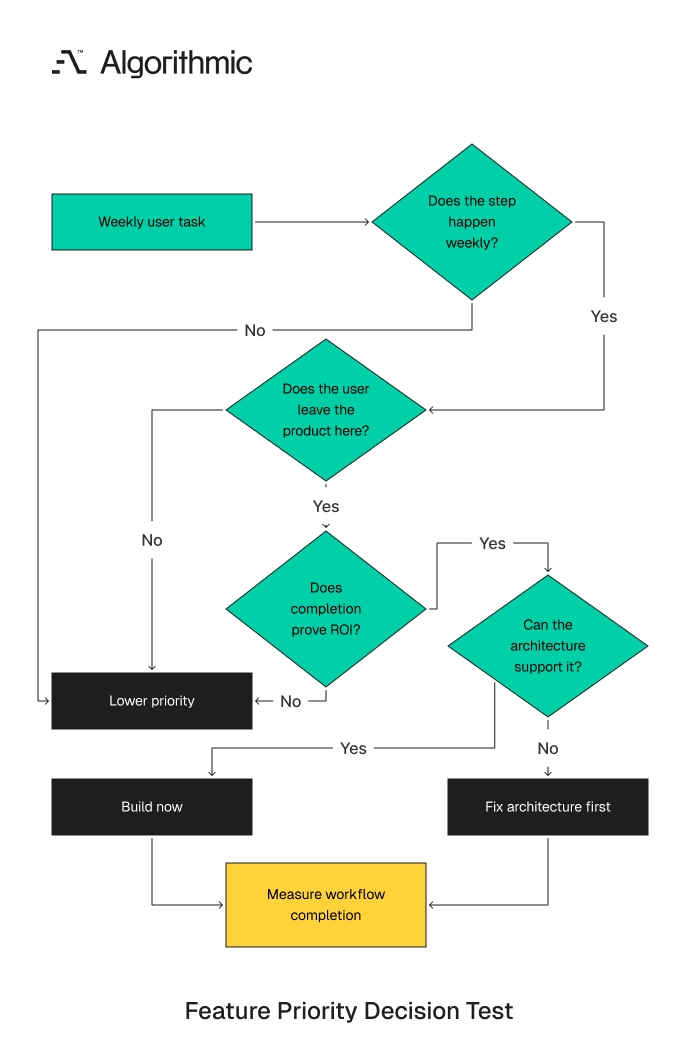
Roadmap debates become sharper when each proposed item is scored against workflow completion. A four-part test works well for early and growth-stage SaaS products. It gives product, engineering, sales, and customer success teams the same decision standard.
The 4-gate workflow test
| Gate | Decision question | Evidence required | Build priority if true |
|---|---|---|---|
| Gate 1: Frequency | Does this step occur weekly for the target user? | Product analytics, support logs, user interviews | High |
| Gate 2: Leakage | Do users leave the product or wait for another team here? | Session paths, exports, integration logs | High |
| Gate 3: Value proof | Does completion help the customer prove ROI? | Renewal notes, QBR data, expansion triggers | High |
| Gate 4: Architecture fit | Can the system support it without fragile workarounds? | Architecture review, data model review, security review | Required before build |
 Click to expand
 A feature that passes all four gates deserves senior engineering attention. A feature that passes only the sales-demand gate should stay out of the next build cycle. This protects the roadmap from one-off commitments that do not improve retained usage.
The test is useful when choosing between a standalone feature and workflow work. For example, a new AI writing assistant can create demo interest. An approval flow, scheduling integration, and performance feedback loop can do more for retained usage because they reduce unfinished jobs.
The same test applies to enterprise requests. A single customer can ask for a custom export, a private dashboard, or a special approval rule. The right response starts with frequency, leakage, value proof, and architecture fit.
If the request exposes a common workflow break, it belongs in the product plan. If it serves one account’s internal process, it belongs in a services discussion or a later configuration layer. This distinction protects engineering capacity. A senior engineering review should add one more discipline: failure-mode analysis. The team should ask what breaks under ten times the account volume, three permission tiers, and two external systems. That question prevents roadmap decisions that create avoidable rework.
The test also gives sales leaders a clear boundary. Sales can still bring market evidence into planning. Product and engineering then translate that evidence into workflow impact before committing roadmap capacity. This reduces internal conflict. A customer request stops being a political debate and becomes an evidence review. The team can explain why one item ships now while another waits for a configuration framework.
Design for the daily operator
B2B SaaS products are often bought by executives and used by junior or mid-level operators. Retention depends on the second group. The buyer approves budget; the operator creates usage depth.
A product for sales teams should account for the representative entering notes between calls. The VP inspecting pipeline health has a different job. Both roles matter, and the daily operator determines whether the data remains current. A product for finance teams should account for the analyst reconciling exceptions. The CFO reviewing dashboards depends on the quality of that operating work. If exception handling is slow, the dashboard loses trust.
A product for operations teams should account for field staff using mobile devices with incomplete connectivity. Offline states, sync recovery, and clear task ownership matter in that environment. Desktop-only assumptions break daily usage.
This changes interface and system design. Chat bars, cards, templates, saved views, bulk actions, and guided exceptions can reduce support demand when paired with sound backend architecture. These are practical product choices.
For software development for non-technical founders, this is one of the highest-risk areas. Founders often specify the buyer-facing demo because it is easier to describe. A strong product engineering team maps the operator’s workflow before finalizing scope. That mapping should include the user’s setting, device, permissions, interruptions, and deadline pressure. A warehouse supervisor, revenue analyst, and customer support lead work under different constraints. The same feature list produces different retention outcomes in those environments.
Operator research should produce artifacts engineers can build from. A useful artifact includes task order, required data, decision points, permissions, exception paths, and success criteria. Interview notes alone do not give a development team enough precision.
The best operator research follows the work in sequence. Watch the user start the task, encounter missing data, ask for approval, recover from exceptions, and report the result. The observation should capture time, systems touched, handoffs, and re-entry points. A two-hour shadowing session often reveals more than ten survey responses. The team sees the browser tabs, spreadsheet exports, Slack messages, and manual checks that never appear in a feature request. Those details become the architecture inputs for retained workflows.
What to measure before adding another feature
Retention work needs better instrumentation than monthly active users. A user can be active while failing to complete the workflow that matters. Account-level measurement should separate curiosity, setup, completion, repetition, and expansion behavior.
Track the following metrics at account and role level:
- Time from signup to first completed workflow
- Percentage of accounts completing the core workflow in week 1
- Repeat workflow rate in weeks 2, 4, and 8
- Number of exports per active account
- Number of workflow steps completed outside the product
- Approval cycle time by role
- Integration failure rate and retry success rate
- Support tickets per 100 completed workflows
- Renewal rate by workflow completion cohort
- Number of active roles participating in the same workflow
- Time from result delivery to the next workflow start
- Percentage of workflows blocked by permissions or missing data
These metrics reveal adoption leakage. A product with high login frequency and low repeat workflow rate has curiosity, not retained value. A product with high export volume trains users to finish work elsewhere.
SBI’s work on usage signals reinforces the same commercial point. Usage consistency is a stronger account-growth signal than broad activity alone. Consistent completion should become a board-level metric for SaaS companies with material renewal exposure. The reporting cadence should match the operating rhythm. Early-stage SaaS teams should review workflow completion weekly. Growth-stage teams should add cohort analysis by segment, plan, role, setup path, and customer success owner.
A useful board metric is the percentage of accounts completing the core workflow at least twice in the first 30 days. Another is renewal rate by workflow completion cohort. These measures connect product design to revenue quality.
Measurement should also inform release acceptance. A shipped feature is incomplete until the team sees whether workflow completion improved. The definition of done should include telemetry, cohort comparison, and support impact.
Metrics should be segmented by role because averages hide workflow failure. An executive can log in twice per month and still receive value from reports. An operator who stops completing work after week two signals a deeper product issue. Plan tier also matters. If entry-tier customers cannot reach measurable outcomes, the pricing structure blocks trust formation. If enterprise customers stall because of permissions and approvals, governance depth belongs higher on the roadmap.
Architecture choices that protect retention
Founders often separate product strategy from architecture too early. That split creates expensive mistakes because retention depends on the way the system represents work. Data models, permission rules, state transitions, and event capture are product decisions.
A scientist-builder starts with the unit of value. In a recruiting product, the unit can be a candidate moved from sourced to accepted. In a finance product, it can be a variance investigated and resolved. Once the unit is defined, the architecture should preserve its history. The system should know who created it, who changed it, who approved it, where it failed, and what outcome followed. That history is the basis for trust, analytics, and renewal evidence.
The strongest early products make fewer promises and represent the chosen workflow precisely. This is a difficult founder decision because broad catalogs feel safer during sales calls. Precision wins after the contract is signed, when the customer must do the work every week.
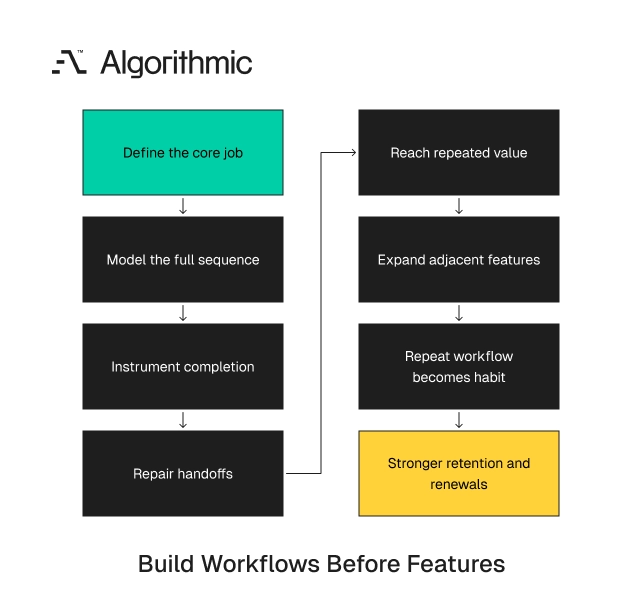
Technical debt also has a retention cost. A fragile import flow delays activation. A weak permission model pushes approvals into email. A missing event model prevents account teams from proving value before renewal. The right sequencing is explicit. Define the job, model the workflow, instrument completion, then add adjacent features. This order gives the team a product system that can learn from production behavior.
Architecture also determines how quickly the team learns. If workflow events are complete, the product team can see failure patterns within days of release. If events are partial, every decision requires interviews, manual analysis, and support interpretation.
A founder should ask three architecture questions before increasing scope. What is the primary workflow object? Which states can that object enter? Which events prove that the customer received value? If the team cannot answer those questions in one diagram, the product is not ready for broad feature expansion. The diagram should be simple enough for a customer success manager to understand. It should be precise enough for engineers to build from.
Build the sequence before expanding the catalog
The highest-return SaaS roadmap items often sit between existing screens. They include permission repair, pricing logic, workflow state, integrations, audit trails, notification rules, and analytics loops. These items turn feature usage into repeated workflow completion. For founders planning a full stack product development effort, the architectural choice should be made early. Define the core workflow, roles, state transitions, and data objects before increasing feature count. This reduces rework and gives the product a retention model that can be measured.
 Click to expand
 For product leaders redesigning an existing SaaS product, start with the Workflow Retention Map. Instrument each stage, identify the largest leakage point, and assign the next six-week build cycle to reducing that leakage. Require evidence of completed sequences before approving another isolated feature. A six-week workflow repair cycle should have a narrow target. For example, reduce approval cycle time from five days to two days. Reduce failed imports by 50%. Cut customer support tickets from 18 to 8 per 100 completed workflows.
The work plan should include product, engineering, design, customer success, and analytics. Engineering owns system changes. Product owns workflow scope. Customer success supplies account evidence. Analytics verifies the behavior change.
This operating model changes roadmap conversations. Teams stop asking how many features they shipped. They start asking how many customers completed the job, repeated it, and renewed because the product became part of their working day. The directive for SaaS founders is straightforward. Build the smallest complete workflow that reaches repeated value. Instrument it, repair the handoffs, and expand the catalog after completion becomes a habit.
That habit is the commercial asset. It produces cleaner renewal conversations, stronger expansion evidence, and lower support burden. It also gives the engineering team a system that improves through production data instead of opinion.
If retention is leaking between steps, the repair is usually a product-engineering job. Algorithmic builds SaaS products where the core workflow, its state, and its drop-off points are instrumented from day one. Have us map your workflow drop-off.