

One checkout edit can move $2 million in annual revenue. A single visual editor change can alter checkout fields, pricing copy, entitlement rules, onboarding flows, and analytics events in under 60 seconds. That speed creates value when the change is reviewed, tested, versioned, and reversible. It creates operational risk when the visual editor becomes a production release path outside engineering control.
Engineering leaders evaluating low-code tools, CMS-driven interfaces, internal admin products, and AI-assisted product editors should treat visual editing as part of CI/CD. The architectural requirement is control over every customer-visible change. Each change needs an owner, a version, a test path, a preview, and a rollback path. Across 35+ complex engagements at Algorithmic, including platforms serving more than 14 million end users, the pattern is consistent. Teams gain release speed when visual editing is governed as code. Teams accumulate regression risk when visual editing bypasses code review, automated validation, and ownership rules.
The cost of unmanaged visual editing usually appears after access expands. A five-person growth team starts with landing page updates, then gains control over pricing sections, experiments, and routing rules. Within one quarter, the visual editor has become a parallel deployment system with weaker controls than GitHub, GitLab, or Bitbucket. In one SaaS engagement, a visual editor controlled three surfaces: a pricing page, a plan comparison module, and checkout routing metadata. The team treated the tool as a marketing system because the interface looked editorial. The release path touched Stripe plan IDs, coupon eligibility, Segment events, and entitlement flags.
That system processed thousands of monthly subscriptions. A copy workflow had grown into a billing release path. The correction took 21 days: Git-backed artifacts, owner review, Playwright checkout tests, and a rollback runbook tied to the last known-good pricing configuration. The lesson was direct, since any interface that changes live customer behavior belongs in the production release system, under the same release gates and tested rollback as engineered code. Visual authoring changes the editing experience, while CI controls the release risk.
Visual editors become deployment systems when they change product behavior
Visual product editing started with content and layout. Marketing teams edited landing pages. Product teams changed help text. Operations teams adjusted labels in internal tools.
That boundary has moved, and modern visual editors can change React components, CMS schemas, feature flags, pricing modules, recommendation placements, form validation, and workflow steps. Retool, Webflow, Builder.io, Contentful, Sanity, LaunchDarkly, and custom admin panels can alter production behavior without a pull request. AI-assisted editors add another layer by generating copy, components, schemas, and workflows from prompts. That creates a second release path.
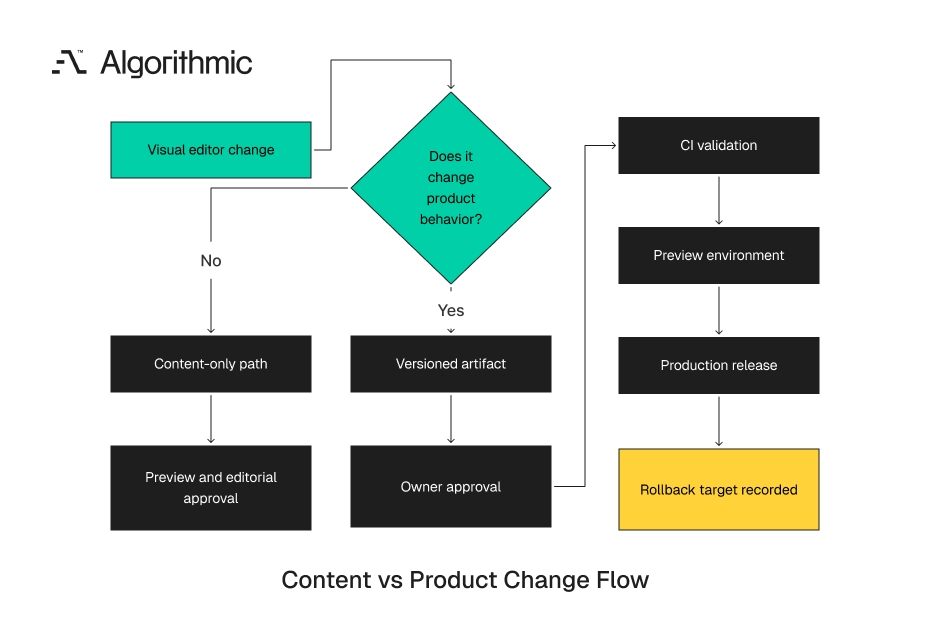
The engineering release path usually has source control, branch protection, automated tests, CI logs, deployment records, monitoring, and rollback procedures. The visual editing path often has role-based access and an audit log. Those controls help with attribution, although they rarely execute tests, enforce code ownership, or block release by product area. A pricing page edit that changes copy is content. A pricing page edit that changes plan mapping, coupon eligibility, or checkout routing is product behavior. The second category belongs inside the engineering control plane.
 Click to expand
 The same distinction applies to internal tools. Renaming a table column label for clarity is presentation work. Changing an approval status, permission rule, refund path, or escalation workflow changes system behavior. This line matters because users experience both categories through the same interface. A customer does not care whether the defect came from a React pull request or a CMS publish button. The production system must treat both sources of change with equal seriousness when they affect behavior.
Visual editors also change how failures are detected. Code releases leave commits, pull requests, build logs, and deployment events. Direct publishes often leave a timestamp, a username, and a vague record such as “updated page.” That record fails during an incident. The on-call engineer needs to know which route changed, which data model changed, which tests ran, and which owner approved publication. Without that record, incident response becomes manual archaeology.
The problem grows as teams connect visual editors to live systems. A page builder connected to a CMS is one risk profile. The same editor connected to Stripe, Segment, Salesforce, or an internal entitlement service becomes part of the operating system. Procurement often misses this change. The buyer evaluates authoring speed, brand control, template quality, and publishing permissions. Engineering later discovers that the tool writes configuration used by checkout, identity, analytics, and customer messaging.
That gap is preventable, so treat every visual editing product as a release product during evaluation. Ask what it can change, where changes are stored, which approvals exist, and how changes reach production.
The failure mode is regression risk disguised as speed
Visual editors create value because they reduce coordination cost. A product manager can adjust onboarding copy without waiting three days for an engineering ticket. A growth team can test a homepage layout without consuming sprint capacity. A customer success team can tune an internal workflow without a full release. Those gains are real and measurable. In one B2B SaaS environment, editor-controlled help text reduced support ticket volume.
The cost arrives when the same surface can change tested assumptions. A no-code edit can remove an accessibility label, break a required analytics event, create an impossible form state, or expose an internal field. The production system sees the change as live configuration. Customers see it as product behavior. Support teams see it as a defect. Engineering teams inherit the incident, even when the code repository shows no recent change.
We see three recurring failure patterns.
Configuration changes that invalidate tested code paths
A React component can pass all unit tests and fail when a CMS editor removes a required field from the page model. TypeScript protects the codebase during compilation. It does not protect production data without CMS schema validation, release checks, and CI enforcement. A common example is a pricing card component that expects planId, displayName, monthlyPrice, and checkoutRoute. The code compiles because those fields exist in the TypeScript type. The production page fails when a CMS entry publishes without checkoutRoute or points to a retired plan.
The same problem appears in internal admin products. A non-engineer changes a workflow status from approved to accepted, and a downstream integration stops matching events. The code did not change; the operating state changed. Event naming creates the same failure. An editor changes trial_started to free_trial_started in an analytics configuration. The product dashboard shows a drop in conversions because Looker and dbt models still expect the original event name.
In one internal platform assessment, six teams used the same event catalog through three different tools. Product analytics lived in Segment, lifecycle email rules lived in Braze, and revenue attribution lived in dbt. A visual editor exposed event names as editable strings, with no validation against the tracking plan. The fix was small and decisive. We replaced free-text event names with a controlled registry, added a JSON Schema check, and blocked publication when the event lacked an owner. That change removed an entire class of analytics incidents without slowing low-risk copy edits.
The same pattern appears with feature flags. An editor changes a flag key from new_checkout_flow to checkout_v2, while the application still reads the original key. The feature disappears for the target cohort, and the experiment report reports false results. Typed configuration prevents this failure class. A flag selector should read from LaunchDarkly, Statsig, Split, or an approved registry. Editors should never type production flag names into open text fields.
Visual changes that break obligations outside the UI
A product image change can carry licensing, disclosure, or provenance risk. This pattern is now visible in AI media workflows, where teams add provenance checks, watermark validation, and QA gates to CI/CD. Media assets become production dependencies, and production dependencies need release gates. The same principle applies to visual product editing. A hero image, pricing claim, AI-generated product photo, or medical disclaimer can carry legal and compliance obligations. Direct publishing moves those obligations outside the release process.
This pattern applies beyond regulated industries. A consumer marketplace that changes product photos can affect seller representations, refund disputes, and trust-and-safety workflows. A healthcare app that adjusts onboarding copy can change the user’s understanding of consent, data sharing, or eligibility. Financial services teams face a sharper version of the issue. Changing “pre-approved” to “eligible” on a lending page can alter compliance review requirements. The edit looks like copy work in the visual tool, yet it affects legal exposure and customer expectations.
The operational problem is traceability. Legal, compliance, and risk teams need to connect a published claim to a review record. A visual editor that only stores page history cannot answer who approved the claim, which source document supported it, and which customers saw it. The same issue appears in subscription businesses. A claim such as “cancel anytime” must match the cancellation path, renewal policy, and customer support scripts. If the cancellation flow requires manual review, the claim needs product and legal approval.
AI-generated imagery raises another concrete risk. A generated model wearing a branded medical device can imply a use case the product is not cleared to support. The image file, prompt, model version, and approval record need the same retention standard as the page content.
Permissions that collapse across roles
A designer needs layout control. A product manager needs experiment control. A marketer needs content control. An engineer owns runtime behavior, data contracts, and failure modes.
Low-code products often compress those roles into one permission: editor. That permission can include content publishing, component changes, data mapping, workflow logic, and third-party script injection. One access grant can therefore exceed the authority of a protected branch in GitHub. That design grants broad production power without matching accountability. The same control failure appears in security reporting on shadow AI and AI-built internal tools. VentureBeat’s report on 5,000 vibe-coded apps and shadow AI risk describes teams creating working software outside the systems built to protect production.
Role compression also creates audit problems. An audit log may show that a user changed a page at 14:03 UTC. It often fails to show which downstream systems were affected, which tests ran, and which accountable owner approved the change. One access review at a mid-market software company found 47 users with production editor rights. Only 12 needed direct publishing access for their job. Four users could change embedded scripts, and none of those changes passed security review.
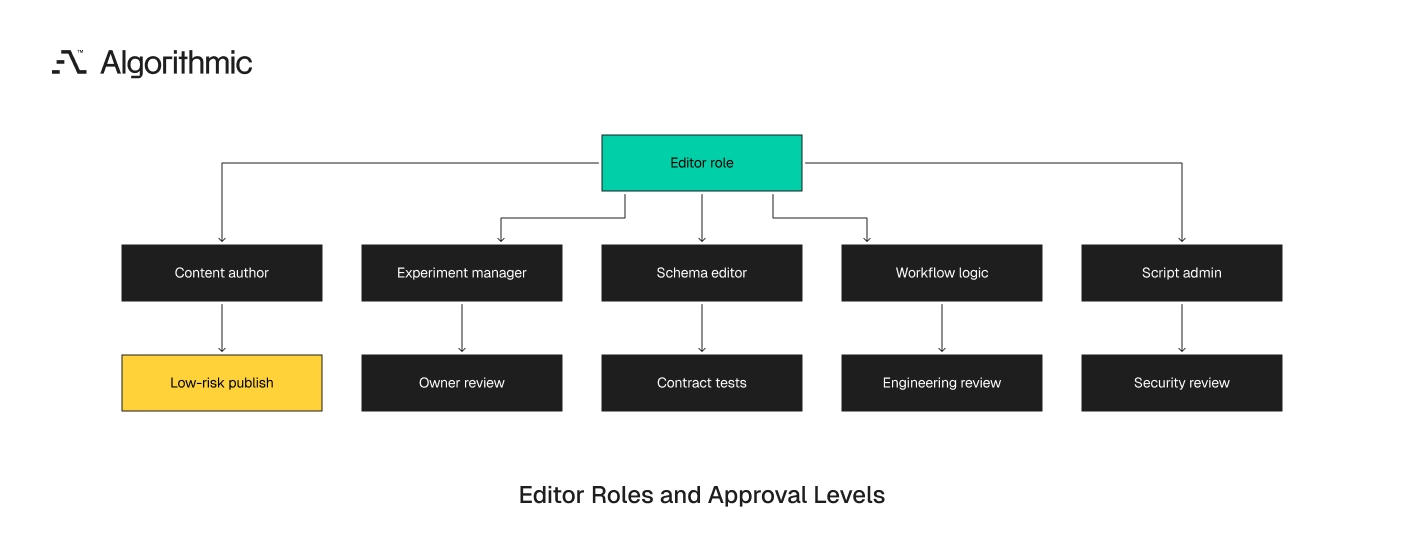
The remediation did not require replacing the vendor. The team split access into content author, content publisher, experiment manager, schema editor, and script administrator. The highest-risk actions moved behind owner approval and CI checks. Granular permissions also reduce accidental escalation. A marketer who can edit copy should not inject JavaScript. A product manager who can manage experiments should not change billing schema fields.
The review model must match the permission model. If a user can edit workflow logic, the system should require workflow owner approval. If a user can edit scripts, the system should require security review before production release.
Treat visual edits as versioned artifacts
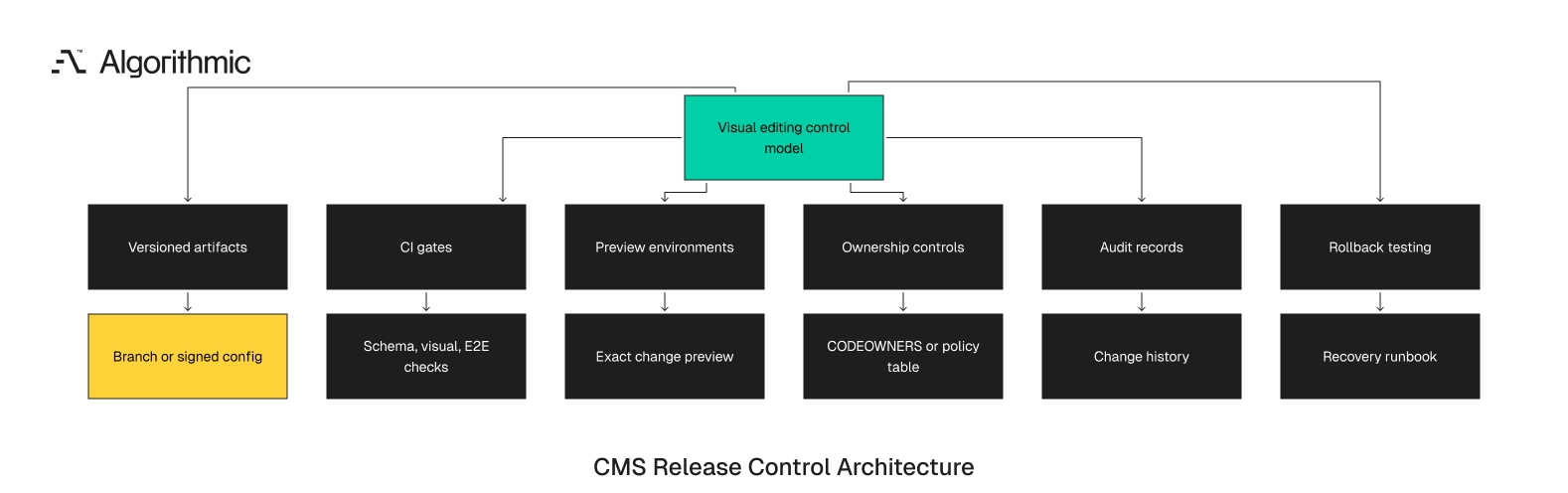
A governed visual editing architecture starts with a simple rule: any change that affects production behavior must exist as a versioned artifact. The artifact can be code, JSON, YAML, CMS schema, feature flag configuration, migration script, or signed media manifest. It needs a stable identity and history. Git remains the simplest control point for most teams. Git-backed visual editing lets non-engineers work in a visual interface while the resulting changes land in a branch, pull request, or review queue. This model supports standard engineering controls: CODEOWNERS, branch protection, CI checks, review comments, and deployment records.
Builder.io can export structured content that reviewers inspect through a repository. Sanity and Contentful can trigger validation pipelines through webhooks. LaunchDarkly flag changes can route through approval workflows, change requests, or API-driven policy checks. Where Git does not fit, teams need an equivalent change ledger. The ledger must record who changed what, when it changed, which environment received it, which tests ran, who approved it, and how to restore the previous version. This ledger should be queryable during an incident instead of buried inside a vendor console.
A useful test is simple. During a production incident, the on-call engineer should identify the last five visual edits to the affected route in under three minutes. If that requires Slack searches, screenshots, or vendor support, the release record is inadequate.
 Click to expand
 The artifact should also separate authoring state from released state. Draft content, preview content, and production content need distinct versions. A vendor history tab that mixes drafts and releases slows incident response.
The minimum artifact model
A production-grade visual editing system should capture five fields for every change:
- Change identity: a unique ID tied to a branch, release, or signed configuration version.
- Owner: the team or person accountable for the affected product area.
- Scope: the components, routes, schemas, flags, or workflows affected.
- Validation record: the automated checks and human approvals completed before release.
- Rollback target: the previous known-good version and the procedure to restore it.
This is basic production software discipline. The interface can be visual. The control model needs to remain engineered. Teams should also store the rendered diff where possible. A JSON diff shows a schema or configuration change. A rendered diff shows whether the user-facing state changed in a checkout step, consent screen, or admin approval form.
For AI-assisted visual editing, store the prompt, generated output, model name, model version, and human approval record. Those fields help teams reconstruct a failure when generated content affects claims, disclosures, component structure, or data mappings. They also support future audits when model behavior changes across releases. The artifact model should include environment identity. A change that passed validation in staging can fail in production when feature flags, seed data, or permissions differ. The release record should name the environment, deployment target, and runtime configuration used during validation.
This matters for multi-tenant platforms. A visual change can affect only enterprise tenants, only users in the European Union, or only accounts on a specific plan. The artifact should capture the audience rules with the same precision as the content itself. Teams should also record dependency versions. A page change that passed against React 18, Next.js 14, and a specific CMS schema should preserve that context. This record matters when a later framework upgrade exposes a latent visual editing defect.
A complete artifact gives incident responders a timeline. They can see the draft, the reviewer, the test run, the release, and the rollback target. That timeline turns a vague customer report into a bounded investigation.
CI must include the behavior that editors can change
CircleCI’s 2026 State of Software Delivery analyzed more than 28 million CI workflows and found that development activity is rising faster than delivery systems can validate, integrate, and recover. That finding applies directly to visual editing. More change volume creates more release pressure unless validation grows with it. Static scans and unit test counts give incomplete assurance. They can show that some code has tests. They cannot prove that CMS content, low-code workflows, feature flag combinations, third-party integrations, accessibility states, performance budgets, and end-to-end paths are safe.
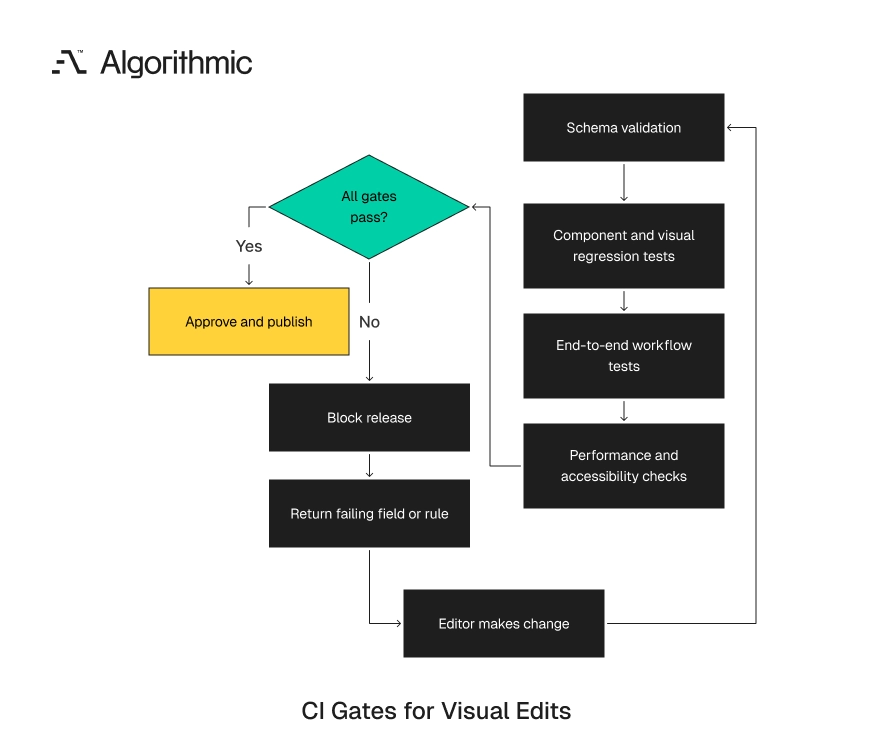
Visual editing needs quality gates that match the surface area being edited. A landing page text edit needs different gates than a billing workflow edit. A security-sensitive admin change requires a stronger path than an image replacement on a low-traffic article. The validation plan should follow the edited behavior. If the editor can change a schema, run contract tests. If it can change an order path, run end-to-end tests.
If the editor can change a user interface, run accessibility and visual regression checks. If the editor can change analytics names, validate the tracking plan. If the editor can change third-party scripts, run security and performance checks.
 Click to expand
 Gate 1 schema and contract validation
Every CMS field, visual component prop, no-code workflow input, and internal admin action needs a schema. JSON Schema, Zod, GraphQL schema validation, OpenAPI contracts, and database constraints all serve this role. Each schema should define required fields, accepted values, formats, and compatibility rules. A visual editor should reject invalid states before CI starts. CI should then validate the same contracts independently. Client-side validation improves authoring; server-side validation protects production.
For example, a CMS model for pricing should restrict currency to ISO 4217 values, require a valid planId, and block expired checkout routes. A workflow editor should reject states that lack outbound transitions. An analytics mapping should reject event names outside the approved tracking plan. Contract validation should also include downstream consumers. If a CMS schema change affects a mobile app, data warehouse model, or customer email template, CI should identify those dependencies before publication. The owner list should include the affected teams.
Schema enforcement should include negative tests. A validation suite should prove that missing plan IDs, retired coupon codes, invalid locales, and unsupported workflow states fail before publication. These tests prevent silent acceptance of invalid operating states. Contracts also need deprecation rules. A field used by iOS version 7.4 should remain available until that version ages out of support. The visual editor should block removal when active clients still depend on the field.
The same rule applies to APIs exposed through internal tools. A workflow builder that writes to a CRM should validate accepted values against the CRM schema. Free-text fields that drive external state should be replaced with controlled selections.
Gate 2 component and visual regression tests
Visual editors often change layout, spacing, typography, images, and conditional rendering. Component tests in Playwright Component Testing, Storybook test runner, Cypress Component Testing, or React Testing Library should cover known states. These tests should include empty states, long text, translated strings, mobile breakpoints, and permission-based variations. Visual regression tools such as Chromatic, Percy, or Playwright screenshots should compare key screens before release. This matters for checkout, onboarding, pricing, account settings, admin approvals, and high-traffic landing pages. Screens that drive revenue or account access deserve stronger screenshot coverage than informational pages.
A 1-pixel change does not warrant release delay. A hidden submit button, shifted consent text, or unreadable mobile layout does. A regression tool should classify expected design drift differently from a failed interaction. Teams should define tolerance rules before incidents occur. For example, a marketing hero image can tolerate a controlled crop change. A payment form cannot tolerate missing labels, obscured error text, or a disabled primary button.
The strongest teams pair screenshots with interaction checks. A screenshot can show that a button exists. A Playwright test verifies that the button receives focus, submits the form, returns errors, and records analytics. Localization deserves explicit coverage, because a German pricing string can exceed the space allocated to an English plan label by 30% or more. A Japanese mobile layout can surface truncation that never appears in desktop English previews.
Visual tests should also cover permission states. An administrator, viewer, and suspended user can see different buttons on the same route. A single screenshot from an administrator session gives false confidence.
Gate 3 end-to-end workflow tests
Any editor-controlled change that touches conversion, payments, account creation, permissions, or data submission needs end-to-end coverage. Playwright and Cypress remain common choices. The tests should exercise the rendered product state created by the proposed edit. The test should run against the preview environment generated from the exact change set. Testing production after publication is incident detection. Testing the preview before publication is release control.
A checkout test should add a product, apply a coupon, calculate tax, create a payment intent, and verify the post-payment entitlement. An onboarding test should create an account, complete required fields, trigger analytics events, and land on the expected first-use screen. An admin workflow test should verify permissions, state transitions, notifications, and audit records. End-to-end coverage can start with the top 10 paths by revenue, activation, account access, or support volume. Expand coverage when incident data shows repeated failures in a specific area. This sequence gives teams measurable protection without building a large test suite upfront.
Test data deserves the same discipline as test code. Checkout tests need valid sandbox products, coupons, tax rules, and entitlement mappings. Admin workflow tests need realistic roles, record histories, and permission boundaries. The test suite should include failure paths. A card decline, invalid coupon, missing required field, and expired session often expose broken visual edits faster than a successful path. Customers spend more time in error states than teams expect.
Teams should also tag tests by business owner. Billing tests should alert the billing platform owner. Account recovery tests should alert security engineering. This routing keeps test failures close to the team that can fix the underlying release.
Gate 4 performance and accessibility budgets
Visual edits can add 8 MB images, third-party scripts, blocking embeds, or inaccessible form states. Lighthouse CI, WebPageTest, axe-core, and bundle analysis should run against edited pages before publication. These tools should run on the preview URL instead of a generic staging page. Define explicit thresholds for each budget. One example is Largest Contentful Paint under 2.5 seconds on the key landing page. Others are no critical axe violations and no JavaScript increase above 150 KB on a core route without engineering approval. A team can also set a 300 KB limit for uncompressed image additions on mobile routes.
Accessibility checks should cover labels, focus order, contrast, error messaging, and keyboard navigation. Automated tools catch part of the problem. High-risk flows still need periodic manual review with screen readers such as VoiceOver, NVDA, or JAWS. Performance checks should include third-party tags added through visual tools. A tag manager update can delay consent banners, slow checkout, or leak data to vendors. CI should treat those changes as production dependencies.
Performance budgets should be visible to editors before publication. An author should see that a proposed image exceeds the mobile limit before the review request begins. Early feedback reduces rework and makes the control model predictable. Accessibility ownership should be explicit. If a visual edit changes form labels or error text, the product owner should accept the release standard. If it changes keyboard behavior, engineering should review the component behavior before release.
Performance and accessibility gates also protect brand teams. They prevent a campaign deadline from turning into a degraded mobile experience. The gate gives editors an objective reason to compress assets or adjust layout before release.
Ownership controls make review enforceable
Review systems fail when ownership is advisory. The CI/CD pipeline should block release when the required owner has not approved the change. Approval should be a release condition, not a comment thread. GitHub CODEOWNERS, GitLab Code Owners, branch protection rules, and policy-as-code tools such as Open Policy Agent can enforce this pattern. Internal tools can apply the same model with workflow state machines and approval tables. The policy should map product areas to accountable teams.
A change to billing copy can route to product marketing. A change to price calculation routes to engineering and finance. A change to account deletion routes to engineering, security, and legal.
 Click to expand
 A change to an AI-generated product image can route through provenance and disclosure review. This mirrors emerging control logic for AI content provenance under standards such as C2PA and SynthID. Provenance records should identify source assets, generation tools, watermark status, and approval history. Ownership also protects non-engineers, giving product, growth, and operations teams a safe path to make changes without becoming accidental release managers. The system tells them which approvals and tests apply before production is touched.
A strong ownership model also reduces escalation noise. Review requests route to the team that owns the route, schema, workflow, or control. Engineering leaders get a clear record of who approved the release and why. Ownership maps should name teams instead of individuals wherever possible. People move roles, take leave, and leave the company. A durable map ties billing to the billing platform team, account recovery to security engineering, and lifecycle messaging to growth systems.
Exception handling also needs design. A revenue-impacting incident may require a same-day pricing copy fix. The policy should permit emergency release with a named approver, a time-boxed exception, and a mandatory review within one business day. Ownership should also define review depth. A typo in billing copy needs marketing approval and a preview. A change to price calculation needs engineering review, finance review, tests, and rollback confirmation.
Every owner should have a backup team. A release path that stops when one person is unavailable creates a new operational risk. The ownership table should list primary and secondary groups for each product area.
The visual editing control matrix
Use this matrix to classify visual editing surfaces before granting production access. The categories separate presentation, product behavior, data contracts, regulated material, and security-sensitive actions. Each category requires a different control level.
| Editing surface | Example change | Required controls | Direct publish allowed |
|---|---|---|---|
| Static content | Blog copy, help text, footer link | Version history, preview, editorial approval | Yes, for low-risk pages |
| Design presentation | Layout spacing, image swap, typography token | Preview, visual regression, accessibility scan | Yes, after automated checks |
| Product flow | Onboarding step order, form fields, CTA routing | PR or change request, owner approval, end-to-end tests | No |
| Business logic | Pricing rules, eligibility, workflow states | Version control, CI, engineering review, audit log, rollback plan | No |
| Data contract | CMS schema, API mapping, event names | Contract tests, migration review, downstream owner approval | No |
| Regulated or legal content | Claims, disclosures, consent language, AI media | Legal approval, provenance record, release record | No |
| Security-sensitive behavior | Permissions, admin actions, account recovery | Security review, test environment validation, incident runbook | No |
This matrix is intentionally conservative. Direct production publishing should be reserved for changes that cannot alter system behavior, customer obligations, or data contracts. That boundary gives teams speed on low-risk work and control over high-risk work. Teams should review the matrix every quarter. Visual tools expand over time as vendors add features and teams connect new data sources. A page builder used for static content in January can control pricing, flags, and checkout routing by June.
The matrix should also guide procurement. During vendor evaluation, ask whether the product supports branch-based review, API export, granular permissions, webhooks, and external release records. A visual editor without those controls will require compensating engineering work. Contract terms matter here, so enterprises should require audit log retention, API access to change history, role export, and environment separation. Those terms reduce future migration cost when the tool becomes part of the release path.
Procurement should also test role boundaries before signing. Ask the vendor to create a content author who cannot change scripts, schema, or workflow logic. If the role model cannot support that separation, engineering must budget for an external control layer. The control matrix should be visible inside the authoring process. Editors should see whether a change is static content, presentation, product flow, or business logic. Classification should happen before review starts, not after a failed production release.
Preview environments turn review into evidence
A screenshot in a ticket is weak evidence. A preview environment is stronger. It lets reviewers inspect the exact version users will see, with the same routes, data shape, and feature flags. Every material visual edit should generate a preview tied to the exact change set. Vercel preview deployments, Netlify deploy previews, Render preview environments, Kubernetes namespaces per branch, or ephemeral environments created with infrastructure as code can all support this model. The preview URL should be attached to the review record and release artifact.
Preview environments should include seeded data for the affected workflow. A checkout edit needs test products, plans, coupons, tax states, and payment sandbox credentials. An admin workflow edit needs users with different roles and realistic status histories. For internal admin products, preview environments matter more than teams expect. Admin tools often lack public traffic, synthetic monitoring, and automated QA investment. A flawed admin edit can corrupt production data faster than a public UI defect.
A common failure pattern is a bulk action hidden behind an admin workflow. An editor changes a filter label or status mapping. The next operator approves 400 records using the wrong state because the preview never exercised realistic data volume. In one operations platform, an admin table displayed “Ready” for two internal states. One state meant a record had passed validation. The other meant a vendor file had arrived, with validation still pending.
A visual editor changed the label without touching application code. Operators then processed hundreds of records before finance identified mismatched reconciliation entries. The correct control was a preview seeded with 500 records across all workflow states. Rollback also needs design, where a safe rollback path restores the previous content version, flag state, schema, and dependent configuration. The target recovery time should be explicit.
For high-traffic product surfaces, a 5-minute rollback target is reasonable. For low-risk content pages, 30 minutes can be acceptable. The target should match customer impact, transaction volume, and operational exposure. Rollback should account for irreversible operations. If an editor-controlled workflow sends emails, issues refunds, changes entitlements, or writes to an external CRM, reverting the configuration is incomplete. The runbook should define compensation steps, customer communication, and data repair procedures.
Preview environments should also test audience rules. A route may render one version for anonymous users, another for paid accounts, and another for administrators. The review record should show which audiences were tested before release. The preview should run against production-like configuration without writing to production systems. Use sandbox Stripe accounts, test email providers, seeded CRM records, and isolated queues. This setup gives reviewers confidence without risking live customer data.
A preview link should also expire. Old previews create confusion during incident reviews and stakeholder approvals. The release record should preserve the artifact, while the live preview can expire after a defined retention period.
Definitions of ready and done should become gates
Many teams write “definition of ready” and “definition of done” documents. Those documents lose value when they live outside the release path. A stronger pattern turns those definitions into engineering quality gates. A visual edit is ready for review when the owner is assigned, scope is declared, preview is generated, and required test categories are selected. It is done when tests pass, approvals are recorded, release notes are generated, and rollback has been verified. The system should prevent advancement until each required field is present.
This removes interpretation from the workflow. A reviewer should not need to infer risk from a screenshot or Slack thread. The release record should describe the change, affected systems, validation, approvers, and recovery path. Definitions should be specific to the surface. A pricing workflow has a different standard than a blog article. An admin permission change has a different standard than a typography token change.
The strongest pattern is machine-readable policy. A pricing route marked as billing should automatically request finance and engineering review. A consent screen marked as legal should automatically request legal approval and store the approval record. Policy should live beside the release system, not in a wiki page. Wiki guidance can explain the rule. The pipeline must enforce it.
Example gate policy for visual product editing
Use the following policy for any surface that can affect customer behavior:
- The change is represented as a versioned artifact.
- The artifact has an owner mapped through CODEOWNERS or an equivalent policy table.
- CI runs schema validation, component tests, accessibility checks, and selected end-to-end tests.
- A preview environment is attached to the review record.
- The reviewer can inspect the exact diff, not only the rendered page.
- The release record lists the editor, approver, timestamp, environment, and rollback target.
- Production publishing is blocked until all required gates pass.
- Rollback is tested at least once per quarter for each high-risk editing surface.
This checklist is short enough to operate. It is also strict enough to prevent the common failure mode: direct publication by someone with broad editor access and no production accountability. The checklist should be embedded in the tooling, not stored as a static document. For teams using Jira, Linear, or ServiceNow, the ticket state should reflect these gates. For teams using GitHub or GitLab, branch protection and required status checks should enforce them. For teams using vendor-native approval tools, API hooks should export the release record to the same place incidents are reviewed.
The policy should also define failure handling. If CI fails because a visual edit violates a schema, the tool should show the failing field and rule. Editors should not need to interpret raw CI logs for routine authoring errors. The gate policy should define reapproval rules. A change approved on Monday should require another approval if the editor changes pricing fields on Tuesday. Approval should attach to the exact artifact, not the general ticket.
Release notes should also be generated from the artifact. They should name the route, audience, owner, and validation path. This record gives support and customer success teams enough context to answer customer reports.
How to implement governed visual editing in 30 days
A full redesign is rarely required. Most organizations can reduce risk in 30 days by placing controls around the highest-risk surfaces first. The work is mainly inventory, classification, CI connection, ownership, and rollback testing. This sequence works because it focuses on live release paths. It does not require a new platform decision before reducing exposure. It also gives executives a clear view of where production changes originate.
The work should have a single accountable lead. In most organizations, that lead sits in platform engineering, developer experience, or product engineering. Security, legal, and growth teams should participate where their surfaces are affected. The 30-day plan should produce operating artifacts, not slideware. Leaders need a tool inventory, a risk map, a gate map, and a rollback record. These artifacts become the foundation for quarterly access reviews.
Days 1 to 5 inventory editing paths
List every tool that can change production behavior. Include CMS platforms, feature flag tools, A/B testing tools, internal admin panels, spreadsheet-driven imports, workflow builders, AI coding products, and visual page builders. Include scripts run by operations teams and vendor dashboards that write production configuration. For each tool, record who has access, what they can change, whether changes are versioned, which tests run, and how rollback works. This inventory often identifies 3 to 5 unowned release paths in mid-sized product organizations. In larger organizations, the number can exceed 20 once regional marketing tools and internal admin systems are counted.
The inventory should include read and write scopes. A user with “editor” access in one product may only publish copy. The same label in another product may allow JavaScript injection, webhook changes, or schema edits. Interview operations and growth teams during the inventory. They often know about spreadsheet imports, vendor portals, and emergency admin scripts that engineering does not track. Those paths deserve the same release classification as branded visual tools.
A useful inventory table has seven columns: tool, owner, production surface, access group, versioning method, validation method, and rollback method. Empty cells identify the first remediation targets. The table should live where engineering leaders review reliability work. Include vendor-managed settings in the inventory. Payment processor dashboards, email provider templates, consent management tools, and customer messaging platforms can all change product behavior. These systems often sit outside the engineering release calendar.
Access data should come from the tool, identity provider, and finance records. Finance can reveal paid seats that engineering does not know about. The identity provider can reveal dormant users with active production access.
Days 6 to 15 classify risk and restrict direct publish
Apply the Visual Editing Control Matrix. Keep direct publishing for low-risk static content. Remove direct production publishing for product flow, business logic, data contract, regulated content, and security-sensitive changes. This does not slow every edit. It routes higher-risk edits through the same controls already used for software releases. The practical result is selective governance instead of blanket approval queues.
Start with the surfaces that affect money, identity, permissions, compliance, and data writes. Checkout, account creation, plan upgrades, account deletion, consent screens, admin approvals, and entitlement changes deserve the first controls. Low-risk help center articles can remain on a lighter path. Access changes should be explicit. Remove broad editor roles where the tool supports more granular permissions. Separate content publishing, experiment control, schema editing, workflow changes, and script injection.
Document exceptions with expiry dates. A temporary editor grant for a launch should end after the launch window. Permanent broad access becomes a standing production risk. Classification should be based on what the tool can change, not the team using it. A marketing-owned editor connected to checkout remains a checkout release path. Ownership labels do not reduce technical risk.
Run the first access review with managers present. Managers can confirm job need, launch timelines, and alternative workflows. This reduces political friction when broad access is removed.
Days 16 to 25 connect changes to CI
Start with the top 10 customer paths by revenue, activation, or support volume. Add schema checks, visual regression tests, accessibility scans, and end-to-end tests for those paths. Tie each test run to the exact change set and preview URL. Do not rely on unit test presence as the primary safety measure. Unit tests rarely capture editor-controlled combinations. The validation path must exercise the rendered product state created by the proposed edit.
A practical first pass can be small. Add Zod or JSON Schema validation for CMS entries. Add Playwright tests for checkout, signup, and account settings. Add Chromatic or Percy to compare pages where visual changes regularly ship.
Add Lighthouse CI and axe-core for edited pages that receive material traffic. Capture the first baseline before enforcing thresholds. After two weeks of data, set limits that reflect user experience and engineering capacity. Connect CI results back into the authoring tool where possible. Editors should see “contract validation failed” or “checkout test failed” inside their review workflow. This feedback loop prevents the pipeline from becoming an engineering-only black box.
Use webhooks when vendors lack native CI support. A CMS publish request can call a GitHub Actions workflow, CircleCI pipeline, Buildkite job, or internal validation service. The publishing action should wait for the result. Store test results with the release artifact. A green checkmark inside a vendor console loses value when the incident review happens three months later. The record should retain the job ID, commit or artifact ID, timestamp, and environment.
Days 26 to 30 assign owners and test rollback
Create an ownership map for edited surfaces. Use CODEOWNERS where possible, and explicit approval tables in tools that do not integrate with Git. Run one rollback drill for each high-risk surface. Measure time to restore the previous version. Record any manual steps that depend on one engineer’s memory, then convert those steps into a runbook.
A rollback drill should include the editor, approver, on-call engineer, and support lead. The team should confirm the previous version, restore it, verify the customer-facing path, and document customer communication triggers. The drill should end with a measured recovery time and a list of automation gaps. By day 30, the organization should have four artifacts: an editing-path inventory, a risk classification, a CI gate map, and a rollback runbook. Those artifacts give leadership a concrete operating model. They also expose vendor limitations before editor access expands.
The 30-day goal is operational control, not perfection. Teams can add deeper tests and richer policy later. The immediate priority is to stop behavior-changing edits from reaching production without ownership, validation, and recovery. The final review should include the executive sponsor. Show the number of release paths found, the number brought under control, and the remaining exceptions. Tie each exception to a named owner and a date.
This cadence makes visual editing governance an operating practice. The team can repeat the inventory every quarter, add new surfaces, and retire exceptions. Governance then becomes part of release hygiene instead of a one-time cleanup.
Operating model for AI-assisted visual editors
AI-assisted product editors add speed and another control requirement. They generate copy, layouts, component structures, schemas, and workflow logic from natural language prompts. The output can look complete while hiding unsupported assumptions. The same governance model applies, with three added records. Store the prompt, generated artifact, and human approval. For customer-visible or regulated material, store provenance and disclosure decisions.
AI-generated changes should never receive a weaker release path than human-authored changes. If a prompt changes a checkout route or eligibility rule, the resulting artifact needs the same CI checks and owner approval. If a prompt generates an image, the media file needs rights review and provenance tracking. Model versioning matters, because a prompt that produced one layout in March may produce a different output in May after a vendor model update. The release record should preserve the generated artifact, not only the prompt.
Teams should also restrict which surfaces an AI editor can write. Allowing AI-assisted editing for landing page copy carries one risk profile. Allowing it to alter permissions, billing rules, or workflow states carries a different operational load. Prompt permissions should map to production permissions. A user who cannot edit billing rules through the UI should not be able to ask an AI tool to edit them. The same rule applies to schema changes, scripts, and permission workflows.
AI review should include provenance for generated media and source attribution for claims. A generated product image should record the model, source assets, watermark status, and approval path. A generated pricing claim should link to the approved source of truth. The failure mode is predictable. A prompt says, “Make checkout shorter for annual plans.” The model removes a field, changes a route, and alters an analytics event. Without CI and ownership controls, that prompt becomes an unreviewed production change.
AI-assisted editors also need prompt retention rules. The prompt can reveal customer data, unreleased pricing, or internal strategy. Retention should satisfy audit needs while protecting sensitive information. The operating model should define approved prompt patterns. A prompt that rewrites marketing copy belongs on a lighter path. A prompt that asks for schema edits, permission changes, or billing changes should route through high-risk release controls.
Human approval must be substantive. A reviewer should compare the generated diff, preview, test results, and source records. Approval of a rendered page alone misses schema, analytics, and workflow changes.
Metrics that show the control model is working
Governed visual editing should improve release speed while reducing incident exposure. Engineering leaders should track both outcomes. A control model that only adds approval latency will be bypassed. Use a small metric set. Track visual edits per week, percentage of edits with versioned artifacts, percentage passing CI on first run, mean approval time, rollback time, and incidents tied to editor-controlled changes. Review these metrics in the same forum used for production reliability.
The first target is visibility. Within 30 days, 90% of behavior-changing visual edits should have an owner, validation record, and rollback target. Within 60 days, high-risk surfaces should have preview-based testing and enforced approvals. Incident data matters more than tool adoption data. If visual-edit incidents decline while release volume rises, the control model is working. If approval time rises and teams move changes into spreadsheets or vendor consoles, the model needs better tooling and clearer risk boundaries.
Track bypasses as production risks. A bypass is any behavior-changing edit released outside the approved path. Each bypass should have an owner, reason, expiry date, and follow-up action. Track false positives as well. If a visual regression test blocks harmless design changes every day, teams will lose trust in the gate. Tuning thresholds is part of operating the system.
A mature control model should reduce mean time to diagnose visual-edit incidents. The target is practical: identify the responsible change, owner, and rollback target in under three minutes. That single metric exposes weak audit records faster than a long governance scorecard. Add one cost metric, tracking engineering hours spent investigating incidents where the repository had no matching code release. A decline in that number shows that visual edits are becoming visible to the release system.
Measure editor experience as well. Track time from draft completion to approved release for low-risk and high-risk edits separately. Low-risk content should remain fast, while high-risk changes should receive controlled review. The dashboard should avoid vanity metrics. A count of published pages says little about production safety. A count of behavior-changing edits with tested rollback says far more.
The engineering leader’s decision rule
Visual product editing is worth adopting when it reduces coordination cost without creating an unmanaged release path. The required architecture is clear: versioned artifacts, CI gates, preview environments, ownership controls, audit records, and tested rollback. These controls are standard engineering practice applied to a new source of production change. The interface can be visual. The production control model should remain the same one used for engineered systems. Customers experience the product through the released interface.
Engineering leaders evaluating low-code tools, CMS-driven interfaces, and internal admin products should run a 30-day control assessment before expanding editor access. Inventory every production editing path, classify each one by risk, remove direct publish for behavior-changing surfaces, and connect the remaining path to CI and ownership review. That sequence gives teams speed with traceability, review, and recovery built into the release path. The decisive test is incident response. If your on-call engineer cannot identify, validate, and reverse the last behavior-changing visual edit in minutes, the editor is already outside your release system. Bring it back under CI before access expands.
Algorithmic builds production engineering and release controls that keep every customer-visible change owned, tested, and reversible, whether it ships from a pull request or a visual editor. Ask us to audit your visual editing paths if a CMS or low-code tool can change checkout, pricing, or permissions in your product.