
[ Insights - Product Development ]
The Software Development Lifecycle - A time-tested protocol for Founders and Product Leaders
A step-by-step guide to the software development lifecycle covering validation, design, architecture, development, testing, and go-to-market strategy.
Read time: 9 minutes
Most software projects undergo challenges in the early stages and we have noticed that it happens so due to skipped conversations (which are important between the teams), unclear objectives, and assumptions that never get tested. By the time the team realizes the foundation is weak, they've already spent months building on it.
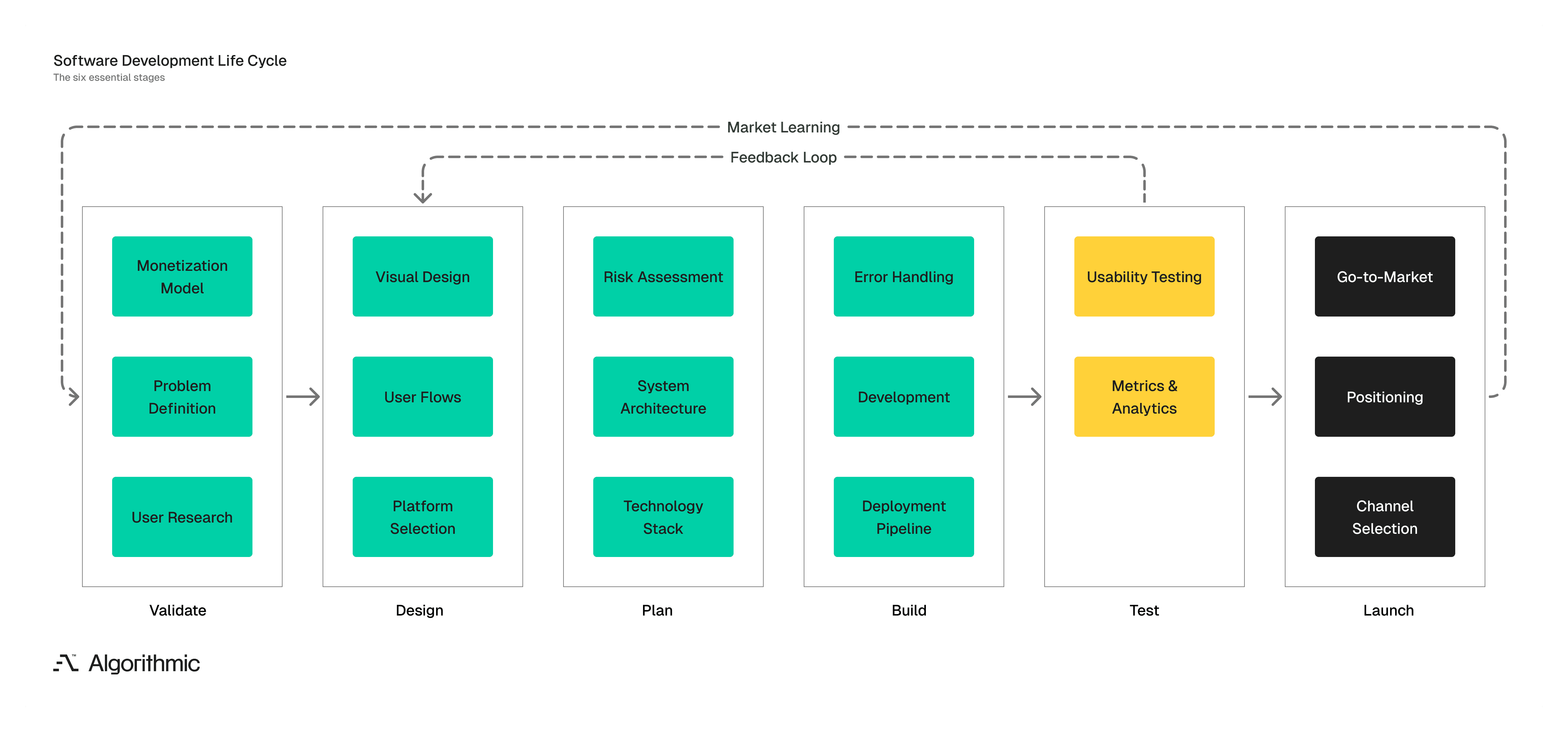
This guide walks through the six stages of taking a software product from concept to market. Each stage includes the decisions you need to make, the risks you need to manage, and the outputs you should have before moving forward.
The diagram below shows how each stage of the software development lifecycle connects. Outputs from one stage become inputs to the next. Skipping stages or rushing through them creates gaps that surface later as rework, missed deadlines, or products that don't fit the market.
Validate the idea before you build (Stage 1)
Every product starts with an idea, and there are few ideas survive contact with the market. Before committing resources, we recommend being able to answer three questions:
Who has this problem? Define a specific user segment. "Small business owners" is too broad. "Independent coffee shop owners managing inventory across 2–5 locations" is actionable.
How do they solve it today? If they use spreadsheets, manual processes, or a competitor's tool, you can position against something concrete. If they don't solve it at all, you need to understand why.
Will they pay for a better solution? Talk to potential users. Ask what they've already tried. Ask what they'd pay. Early conversations reveal whether your idea solves a real problem or a hypothetical one.
Monetization strategy
It is important to define your pricing model early. The three most common approaches for software products:
Subscription (SaaS): Recurring monthly or annual fees. Works when the product delivers ongoing value.
Transactional: Users pay per action or usage. Works for APIs, marketplaces, and consumption-based tools.
Freemium: Free tier with paid upgrades. Works when the free version creates habit and the paid version removes friction.
Your pricing model affects your product architecture, your user acquisition strategy, and your unit economics. If we decide this early - it is helpful, but the architecture of the product must be flexible to adapt based on market feedback.
Design the experience before the interface (Stage 2)
This is where we at Algorithmic are extremely particular. We do not think that design is about colors and fonts. Design is about aesthetics, users, experiences and most important decisions that must be market and user-led.
Define user flows first
Map the critical paths a user will take through your product:
What is the first action a new user takes?
What does success look like for that user?
What are the three to five core tasks the product must support?
Document these flows before opening a design tool. Flowcharts and written descriptions force clarity. Visual mockups can obscure logic gaps with pretty screens.
Choose your platforms
In the below table ew cover a wide range of platforms we at Algorithmic specialize in. Platform decisions affect development cost, timeline, and market reach:
Approach | Tradeoff |
|---|---|
iOS only | Smaller market, faster development, higher average revenue per user |
Android only | Larger global market, more device fragmentation |
Cross-platform (React Native, Flutter) | Broader reach, shared codebase, some performance and native feature limitations |
Web-first | No app store friction, works on any device, limited access to device hardware |
If your product depends on hardware features such as a camera, GPS, sensors, or offline access - native development may be necessary. If your product is primarily content or data, web or cross-platform approaches reduce time to market.
Visual design must come last
Brand elements such as colors, typography, iconography matter a lot since they affect product perception and trust. Having said that, they should follow functional decisions, not precede them.
In other words, design the skeleton before decorating the room.
Plan the technical architecture (Stage 3)
Technical planning is where cost overruns and timeline failures originate. The decisions made here constrain everything that follows.
System architecture
You need to decide how your system's major pieces will fit together and talk to each other. There are three common approaches:
Monolith: Everything lives in one codebase. Deployment is straightforward. The downside? When one feature needs to scale, the whole system comes along for the ride. For early-stage products, this simplicity is usually worth it.
Microservices: Independent services that can be updated and scaled on their own. Sounds great—until you realize you're managing a dozen small systems instead of one big one. Makes sense when your product has distinct domains that evolve at different speeds.
Serverless: Functions that run on demand. No servers to manage. Costs scale with actual usage, not projected capacity. Works well for MVPs and products with unpredictable traffic.
Most new products should start with a monolith or go serverless. Microservices look impressive on architecture diagrams, but they add overhead early-stage teams rarely have the bandwidth to manage. You can always break things apart later.
Technology stack
Your stack is the collection of tools and languages that make your product run. Four layers to think about:
Frontend: What users actually see and touch. This could be React for web apps, Swift for iOS, Kotlin for Android, or Flutter if you're going cross-platform.
Backend: Where the business logic lives. Node.js, Python, Go, Java—each has strengths, and teams have strong opinions. More on that in a moment.
Database: Where your data sleeps at night. PostgreSQL handles relational data well. MongoDB works for document-style storage. Redis is your friend when you need caching for speed.
Infrastructure: Where the whole thing actually runs. AWS, Google Cloud, Azure, or some combination. Each has tradeoffs in pricing, tooling, and learning curve.
What matters more than any of these choices is to pick technologies your team already knows. A team proficient in Python will ship faster in Python than in a "better" language they're learning on the job. Trending tools make for good conference talks. Familiar tools make for shipped products.
Non-functional requirements
These are the requirements nobody notices until something is dysfunctional. They determine whether your product survives its own success:
Security: How users authenticate. How data gets encrypted (at rest and in transit). How you validate inputs and manage dependencies. Get this wrong and nothing else matters.
Performance: How fast should pages load? How many users can hit the system at once? How much data will you be handling in six months? In two years? Set targets now so you can design for them.
Reliability: What's your uptime goal? How do backups work? Who gets woken up at 3 AM when something fails, and how will they know? Monitoring and alerting aren't glamorous, but they save you.
Maintainability: Code standards everyone follows. Documentation that actually exists. Deployment processes that don't require tribal knowledge. Future-you will be grateful.
Document all of this before development begins. These requirements are painful and expensive to retrofit once the system is built.
Risk assessment
Every project carries risk. The goal isn't to eliminate it—that's impossible. The goal is to see it clearly and plan for it. Four categories to work through:
Technical: Are you betting on unproven technologies? Do you have integration dependencies you don't fully control? Are there performance unknowns that could surface late? Name them now.
Regulatory: Data privacy laws like GDPR and CCPA. Industry-specific compliance like HIPAA for health data or PCI-DSS for payments. Geographic restrictions on where data can live. Surprises here are expensive.
Budget: What's your realistic development cost? What will infrastructure cost at projected scale, not just at launch? Do you have contingency for the things you haven't thought of yet?
Timeline: What depends on what? Are there external integrations with timelines you don't control? Do you need to hire or contract for skills you don't have in-house?
For each risk, write down three things: how likely it is, what happens if it hits, and what you're doing to reduce it. Review this list weekly during development. Risks change as you learn more about the product.
The build phase (Stage 4)
Development is where strategy becomes tangible. Everything you planned in stages one through three now has to be executed, and the quality of that execution determines whether you ship something solid or spend the next year cleaning up mistakes.
Development principles
Two principles will save you enormous pain down the road, and they're worth embedding into your team's DNA from the start.
Single Responsibility: Every function, class, or module should do exactly one thing. When requirements change, and they always do, you want to modify one component rather than chase dependencies across your entire codebase. This discipline is what allows teams to stay agile even as the product grows more complex.
Don't Repeat Yourself: When you duplicate logic, you create inconsistency waiting to happen. The first time a business rule changes, you'll update it in one place and forget the other three. Extract common patterns into shared components early. The investment in clean abstraction pays off every single time something needs to change.
These aren't theoretical best practices you can ignore under deadline pressure. They're the operational discipline that separates teams who can move fast from teams who are drowning in technical debt six months from now.Deployment Pipeline
Deployment pipeline
You should set up automated deployment infrastructure from day one, and we cannot stress this enough. Manual deployments are one of the most common sources of avoidable problems we see in early-stage teams.
Version Control: All of your code should live in a centralized repository, and Git is the industry standard. You need a clearly defined branching strategy that everyone follows. This is the foundation of collaboration, and it gives you a complete audit trail of every change.
Automated Testing: Your tests should run automatically on every code change, and broken tests should block deployment. This catches problems early when they're cheap to fix, rather than in production when they're expensive and embarrassing.
Staging Environment: You need a production-equivalent environment where you can validate changes before they go live. This is your last opportunity to catch issues before real users encounter them.
Production Deployment: Your deployment process should be automated, repeatable, and reversible. When something goes wrong, and eventually it will, you need the ability to roll back in minutes rather than hours.
Manual deployments introduce human error, slow down your iteration speed, and create dangerous dependencies on specific people. Automation is an investment that compounds throughout the entire life of your product.
Error handling and logging
Things will break. That's not pessimism - it's reality. What matters is how quickly you can diagnose what went wrong and recover from it.
Contextual Logging: You need to capture enough information to actually reproduce problems when they occur. That means timestamps, user context, input state, and stack traces. Teams that skimp on logging create blind spots that make incident response a nightmare.
Health Monitoring: You should instrument your application so you can see what's happening in real time. Set thresholds and alerts for anomalies so you find out about problems before your users start complaining on social media.
User-Facing Error Messages: When something goes wrong, users should see a message that's helpful without exposing your system internals. They need to understand that an error occurred and what they should do next. They should never see a stack trace or a cryptic error code.
Test with real users (Stage 5)
An uncomfortable truth to accept - your assumptions about how users will behave are (almost always) wrong. The degree of wrongness varies, but some portion of what you built will confuse people, frustrate them, or simply fail to matter to them at all. The only way to find out which parts is to put the product in their hands and watch what happens.
Usability testing
You should conduct structured sessions with actual users from your target audience. Have them complete specific tasks while you observe. Ask them to think out loud as they navigate so you can understand their mental process.
You will discover things that internal testing simply cannot reveal.
Misaligned Mental Models: You'll find labels, icons, and navigation patterns that make perfect sense to your team but completely confuse actual users. This gap is invisible when you're inside the building because you're too close to the product.
Expectation Gaps: Users will look for features they assume should exist but don't. These represent table-stakes requirements in your category that you may have overlooked.
Unused Capabilities: You'll watch users completely ignore features that your team invested significant time building. It's better to learn this now than to keep iterating on something that doesn't actually matter to anyone.
Friction Points: You'll identify specific steps in your flow where users hesitate, get confused, or give up entirely. Each of these is a leak in your conversion funnel that you can now address.
You don't need hundreds of test participants to get value from this. Five users will surface the majority of critical usability issues. And you should start testing with rough prototypes rather than waiting for polished features. Early signal is far more valuable than late validation.
Metrics to track
You need to define your key metrics before you launch, not after. These are the numbers that will guide your decisions once the product is live.
Activation: You want to know what percentage of new signups complete their first meaningful action. This is your leading indicator of whether the product is delivering on its promise at the individual user level.
Retention: You need to track what percentage of users come back after day one, day seven, and day thirty. Your retention curve tells you whether the product delivers sustained value or just generates initial curiosity that fades quickly.
Engagement: You should measure how frequently active users interact with your product and which features they actually use. Engagement depth shows you where your product creates genuine utility versus where it falls flat.
Conversion: If you have a freemium or trial-based model, you need to know what percentage of users upgrade to paid. This is the ultimate signal that people perceive enough value to open their wallets.
Make sure your product is instrumented to capture these metrics from the day you launch. Decisions made without data are just educated guesses, and sometimes they're not even that educated.
Bring the product to market (Stage 6)
Building the product is only half the work. You also have to get it in front of the right people, through the right channels, with the right message. This is where your go-to-market strategy comes into play.
Define your audience
Go back to the user segment you defined in stage one and add more behavioral detail. You need to understand how these people actually operate.
Digital presence - Where do they spend their time online? Which platforms, communities, or forums do they visit regularly?
Information sources - What publications, newsletters, podcasts, or influencers shape how they think? Whose opinions do they trust when evaluating new tools?
Discovery behavior - How do they currently find and evaluate products like yours? Do they search on Google? Ask peers for recommendations? Attend industry events?
Your go-to-market strategy should meet these people where they already are. Trying to change user behavior is expensive and unreliable. Intercepting them in channels they already use is efficient and far more likely to succeed.
Position yourself well (not to be missed)
Your positioning answers a fundamental question - why should someone choose your product over the alternatives, including doing nothing at all?
A strong positioning statement has four components, and you should be able to articulate each one clearly.
For: Who exactly is this product designed for? Be specific about the target user.
Who: What problem or unmet need do they experience? Describe it in terms they would recognize.
Our product is: What category does this fit into? This gives people a frame of reference.
That: What's the primary benefit or differentiator? Why is this better than what they're using now?
Write this statement out. Test it with people outside your team. Refine it until it's clear, memorable, and something you can defend. Then use it consistently across every piece of marketing and sales material you produce. Inconsistent positioning confuses your market and dilutes the impact of everything you do.
Select your marketing channels
Different products require different distribution strategies:
Channel | Best For |
|---|---|
Content marketing (SEO, blog) | Products with long consideration cycles and search-driven discovery |
Paid acquisition (ads) | Products with strong unit economics that can afford customer acquisition cost |
Product-led growth | Products where free usage naturally leads to paid conversion and referral |
Partnerships | Products that complement existing platforms or workflows |
Direct sales | High-value products with complex buying processes |
Start with one or two channels and master them before expanding.
The foundation will determine outcomes
Each stage in this process feeds directly into the next one. When you skip validation, you end up building something that nobody actually needs. When you skip technical planning, you'll find yourself rewriting the things you rushed through. When you skip user testing, you'll ship features that don't land the way you expected them to. The pattern among teams that ship well is remarkably consistent. They go slow in the early stages so they can move fast when it matters most. They treat the foundational work as the real work, not just the preamble before coding begins.
If you're starting something fresh or revisiting a product that's gotten stuck, go back to stage one. Test the assumptions you've been taking for granted. Identify and close the gaps you may have glossed over. Then build from a foundation you can trust.
Algorithmic is a software engineering studio that partners with founders and teams across the full product lifecycle. Our core areas of focus include end-to-end product development, applied machine learning & AI, and data analytics & infrastructure.
If you’d like to follow our research, perspectives, and case insights, connect with us on LinkedIn, Instagram, Facebook, X or simply write to us at info@algorithmic.co